
MB-310 · Question #74
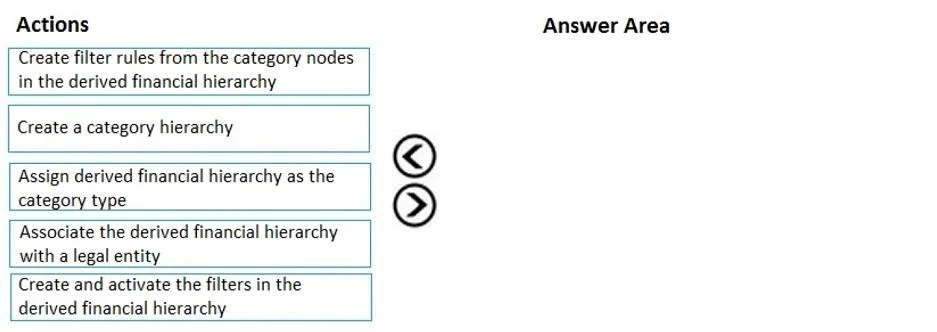
Drag and Drop Question A public sector organization wants to set up the derived financial hierarchy to analyze posted transaction data. You need to set up the derived financial hierarchy to generate…
The correct answer is Create a category hierarchy; Assign derived financial hierarchy as the category type; Associate the derived financial hierarchy with a legal entity; Create filter rules from the category nodes in the derived financial hierarchy; Create and activate the filters in the derived financial hierarchy. Derived Financial Hierarchy Setup - Order Explained This question is from Microsoft Dynamics 365 Finance, covering the setup of a derived financial hierarchy used to categorize transaction data for outgoing electronic documents (e.g., payment files). The steps follow a strict…
Question
Exhibit
Answer Area
Drag items
Correct arrangement
- Create a category hierarchy
- Assign derived financial hierarchy as the category type
- Associate the derived financial hierarchy with a legal entity
- Create filter rules from the category nodes in the derived financial hierarchy
- Create and activate the filters in the derived financial hierarchy
Explanation
Derived Financial Hierarchy Setup - Order Explained
This question is from Microsoft Dynamics 365 Finance, covering the setup of a derived financial hierarchy used to categorize transaction data for outgoing electronic documents (e.g., payment files).
The steps follow a strict dependency chain - each step creates the prerequisite for the next.
Step-by-Step Reasoning
1. Create a category hierarchy The hierarchy structure itself must exist first. Everything else - type assignment, legal entity linkage, filters - depends on having a hierarchy object to attach to. You cannot assign a type to something that doesn't exist.
2. Assign derived financial hierarchy as the category type Once the hierarchy exists, you designate its purpose by assigning it the "Derived financial hierarchy" category type. This is what distinguishes it from other hierarchy types (like procurement or retail). Skipping this means the hierarchy has no financial context and subsequent steps won't apply correctly.
3. Associate the derived financial hierarchy with a legal entity After the hierarchy is typed, it must be scoped to a legal entity. D365 Finance is multi-entity, so a hierarchy has no operational effect until it's linked to the company that will use it. Filter rules you create next are only meaningful within this entity context.
4. Create filter rules from the category nodes in the derived financial hierarchy With the hierarchy active in a legal entity, you now create filter rules on its category nodes. These rules define how transactions (vendors, customers, accounts) are categorized. You cannot create filter rules without category nodes, which come from the hierarchy built in step 1.
5. Create and activate the filters in the derived financial hierarchy This is the final operationalization step. Filters are created (defining criteria) and then activated, making them live for transaction analysis and electronic document generation. Activation is deliberately last - you must have fully configured rules before switching them on.
Common Mistakes
- Reversing steps 4 and 5 - Candidates sometimes think "create and activate" is a single setup action done before rule creation. Activation is always the final gate, not a configuration step.
- Skipping the category type assignment (step 2) - Jumping from "create hierarchy" directly to "link to legal entity" is a frequent error. Without the correct type, the hierarchy won't behave as a derived financial hierarchy in the system.
- Trying to associate with a legal entity before typing (step 3 before 2) - The system requires the category type to be set before a legal entity association is valid for this hierarchy type.
Mental model: Think of it as Build → Label → Scope → Configure → Activate. Each action unlocks the next; none can be skipped or reordered without breaking the dependency chain.
Topics
Community Discussion
No community discussion yet for this question.