
MB-310 · Question #80
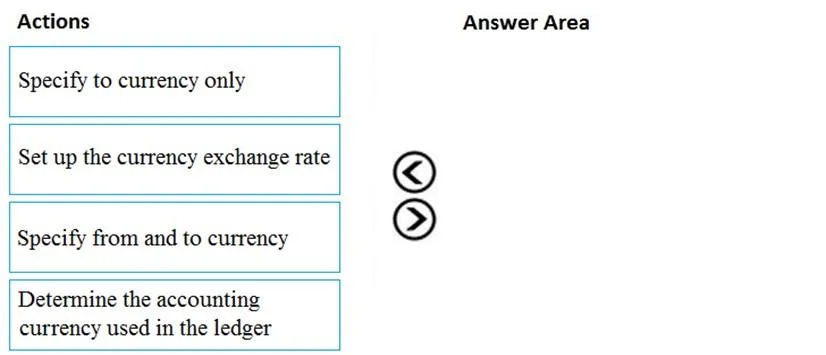
Drag and Drop Question You are a consultant who is implementing Dynamics 365 Finance in your organization. You need to set up currencies and exchange rates for a client. Which three actions should…
The correct answer is Determine the accounting currency used in the ledger; Set up the currency exchange rate; Specify from and to currency. Dynamics 365 Finance: Currency & Exchange Rate Setup - Explained --- Correct Sequence | Step | Action | |------|--------| | 1 | Determine the accounting currency used in the ledger | | 2 | Set up the currency exchange rate | | 3 | Specify from and to currency | --- Why This…
Question
Exhibit
Answer Area
Drag items
Correct arrangement
- Determine the accounting currency used in the ledger
- Set up the currency exchange rate
- Specify from and to currency
Explanation
Dynamics 365 Finance: Currency & Exchange Rate Setup - Explained
Correct Sequence
| Step | Action |
|---|---|
| 1 | Determine the accounting currency used in the ledger |
| 2 | Set up the currency exchange rate |
| 3 | Specify from and to currency |
Why This Order?
Step 1 - Determine the accounting currency used in the ledger
Technical reason: The accounting currency is the foundation of all financial transactions in D365 Finance. It is defined in General Ledger > Ledger and represents the legal entity's primary currency. You must know this first because every exchange rate you configure is relative to this base - without knowing it, you cannot meaningfully set up any rate. This is a prerequisite, not an optional step.
Step 2 - Set up the currency exchange rate
Technical reason: Once the accounting currency is established, you navigate to General Ledger > Currencies > Currency exchange rates and create an exchange rate record (associating it with an exchange rate type, e.g., Standard or Budget). This step initializes the rate configuration before specifying the currency pair details.
Step 3 - Specify from and to currency
Technical reason: This is the final detail within the exchange rate record - defining the currency pair (e.g., USD → EUR). D365 Finance requires both a source ("from") and destination ("to") currency for a rate to be valid. This step completes the setup by making the rate applicable to actual transactions.
The Distractor: "Specify to currency only"
This item is not used and represents a common misconception. An exchange rate is inherently a relationship between two currencies - specifying only the destination currency produces an incomplete, unusable rate. D365 Finance requires both ends of the pair to calculate conversions correctly.
Common Mistakes
- Skipping Step 1: Jumping straight to exchange rate setup without verifying the ledger's accounting currency leads to misconfigured rates against the wrong base.
- Confusing Steps 2 and 3: Some candidates think "set up the rate" already implies specifying currencies. In D365, setting up the rate (type/record) and defining the currency pair are distinct actions within the workflow.
- Choosing "to currency only": This is the trap answer - always remember exchange rates are bidirectional pairs.
Topics
Community Discussion
No community discussion yet for this question.