
MB-310 · Question #82
Drag and Drop Question A client observes that some customers are late paying their invoices. The client wants to use the Credit and Collections functionality to send collection letters to customers…
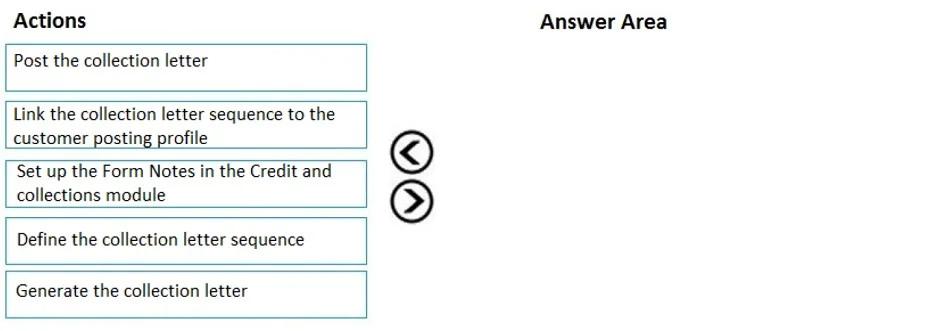
The correct answer is Set up the Form Notes in the Credit and collections module; Define the collection letter sequence; Link the collection letter sequence to the customer posting profile; Generate the collection letter; Post the collection letter. Collection Letter Configuration - Order Explained This question tests knowledge of Microsoft Dynamics 365 Finance (Credit and Collections module). The correct order follows a logical setup → configure → activate → execute pattern. --- Why This Order? Each step depends on the…
Question
Exhibit
Answer Area
Drag items
Correct arrangement
- Set up the Form Notes in the Credit and collections module
- Define the collection letter sequence
- Link the collection letter sequence to the customer posting profile
- Generate the collection letter
- Post the collection letter
Explanation
Collection Letter Configuration - Order Explained
This question tests knowledge of Microsoft Dynamics 365 Finance (Credit and Collections module). The correct order follows a logical setup → configure → activate → execute pattern.
Why This Order?
Each step depends on the previous one existing in the system. You cannot reference something that hasn't been created yet.
Step-by-Step Breakdown
1. Set up the Form Notes in the Credit and Collections module
This is pure prerequisite configuration - you define the message text that will appear on the printed/emailed collection letters. It must exist first because the collection letter sequence will reference these notes. Without this, letters have no content to display.
2. Define the collection letter sequence
A sequence defines how many letters to send, in what escalating order (e.g., Reminder → Warning → Final Notice), with thresholds (days overdue, minimum balance) and fees per level. This must exist before you can link it to anything. This is the core business rule object.
3. Link the collection letter sequence to the customer posting profile
Customer posting profiles control how accounting entries behave per customer group. Attaching the sequence here tells the system which customers get which letter escalation path. This step bridges setup to actual customers - you can't do this until both the sequence (step 2) and the posting profile exist.
4. Generate the collection letter
This is the first operational step - you run a batch/process that evaluates open invoices against the thresholds defined in the sequence and creates draft collection letter records for eligible customers. Generation produces a document in a proposed state, not yet official.
5. Post the collection letter
Posting finalizes and records the collection letter. This books any associated fees to the customer account, advances the customer to the next letter level in the sequence, and makes the letter official. You cannot post before generating - there is nothing to post.
Common Mistakes
| Mistake | Why It's Wrong |
|---|---|
| Linking the sequence before defining it | The sequence doesn't exist yet - nothing to link |
| Generating before linking to a posting profile | The system doesn't know which customers are in scope |
| Skipping Form Notes setup | Letters generate without content, or the process errors on missing note references |
| Posting before generating | Post acts on generated records - no generated record means no action |
| Treating Generate and Post as a single step | They are deliberately separate: Generate allows review/correction before committing fees |
Mental Model
Think of it as: Build the tool → Aim it → Pull the trigger → Record the shot.
Setup and definition steps (1–3) are all configuration. Generate (4) is execution with a review gate. Post (5) is the irreversible commit.
Topics
Community Discussion
No community discussion yet for this question.