
MB-310 · Question #279
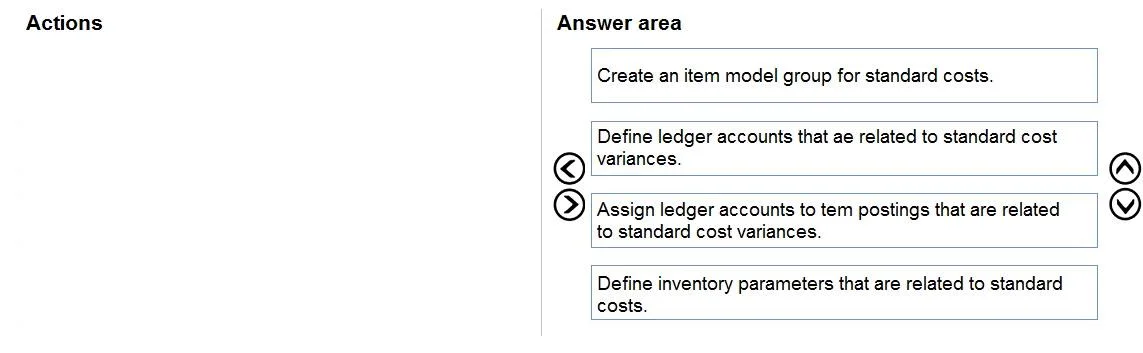
Drag and Drop Question You are setting up a process to track, record, and analyze costs associated with the products and activities for a nonmanufacturing organization. You need to configure the…
The correct answer is Create an item model group for standard costs.; Define ledger accounts that ae related to standard cost variances.; Assign ledger accounts to item postings that are related to standard cost variances.; Define inventory parameters that are related to standard costs. Standard Costing Setup - Order Explained This question is from Microsoft Dynamics 365 Finance & Operations and tests knowledge of the prerequisite configuration sequence for standard costing. --- The Logic: Foundation → Ledger Definition → Ledger Assignment → System Parameters…
Question
Exhibit
Answer Area
Drag items
Correct arrangement
- Create an item model group for standard costs.
- Define ledger accounts that ae related to standard cost variances.
- Assign ledger accounts to item postings that are related to standard cost variances.
- Define inventory parameters that are related to standard costs.
Explanation
Standard Costing Setup - Order Explained
This question is from Microsoft Dynamics 365 Finance & Operations and tests knowledge of the prerequisite configuration sequence for standard costing.
The Logic: Foundation → Ledger Definition → Ledger Assignment → System Parameters
Each step depends on the previous one existing before it can be configured correctly.
Step-by-Step Breakdown
1. Create an item model group for standard costs
This is first because the item model group is the foundational object that tells the system which costing methodology (standard cost) applies to items. Without it, the system has no context for why you need specific ledger accounts or variance tracking. Everything downstream depends on items being classified under this group.
Common mistake: Skipping this and going straight to ledger setup - you'll have no group to associate the costing behavior with.
2. Define ledger accounts related to standard cost variances
Before you can assign accounts to anything, the accounts must exist in the chart of accounts. This step creates the actual G/L accounts (e.g., purchase price variance, production variance). You're defining the financial instruments themselves here.
Common mistake: Confusing "defining" accounts with "assigning" them. Defining = creating the G/L account record. Assigning = linking it to a posting profile.
3. Assign ledger accounts to item postings related to standard cost variances
Now that the G/L accounts exist (step 2), you can wire them into inventory posting profiles. This step tells the system: "When a standard cost variance event occurs, post to these specific accounts." This step is technically dependent on step 2 - you cannot assign accounts that don't yet exist.
Common mistake: Doing this before step 2. The accounts won't be available to select in the posting profile setup.
4. Define inventory parameters related to standard costs
This is last because inventory parameters act as system-wide behavioral switches (e.g., enabling standard cost recalculation, setting active cost version rules). These parameters reference or activate the structures you've already built in steps 1–3. Configuring parameters before the supporting structure is in place risks misconfiguration or settings that have nothing to attach to.
Common mistake: Doing this first, assuming it's a "global settings" step that should precede everything. In practice, it finalizes/activates the setup, not initializes it.
Summary Pattern
| Step | What you're doing | Why it must come here |
|---|---|---|
| 1 | Item model group | Establishes costing method - foundational |
| 2 | Define G/L accounts | Accounts must exist before they can be assigned |
| 3 | Assign G/L accounts to postings | Requires accounts from step 2 to exist |
| 4 | Inventory parameters | Activates/governs the completed setup |
The sequence follows a strict build-before-use dependency chain - you cannot reference something that doesn't exist yet.
Topics
Community Discussion
No community discussion yet for this question.