MB-280 · Question #88
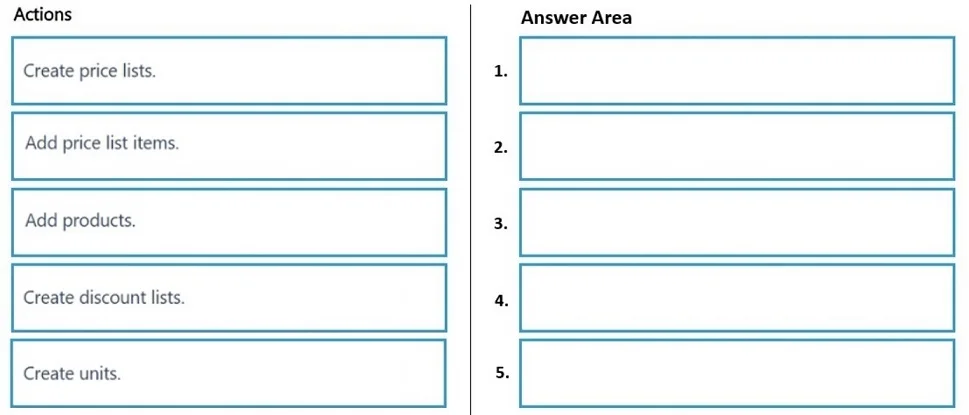
Drag and Drop Question A company uses Dynamics 365 Sales to manage product lines. You need to set up the product catalog, including the ability for sellers to apply quantity discounts. In which…
The correct answer is Create units.; Add products.; Create price lists.; Add price list items.; Create discount lists. Dynamics 365 Sales: Product Catalog Setup Order Why This Order Exists: Dependency Chain Each step has hard or soft dependencies on the previous ones. Think of it as a stack - lower layers must exist before upper layers can reference them. --- Step-by-Step Breakdown 1. Create…
Question
Exhibit
Answer Area
Drag items
Correct arrangement
- Create units.
- Add products.
- Create price lists.
- Add price list items.
- Create discount lists.
Explanation
Dynamics 365 Sales: Product Catalog Setup Order
Why This Order Exists: Dependency Chain
Each step has hard or soft dependencies on the previous ones. Think of it as a stack - lower layers must exist before upper layers can reference them.
Step-by-Step Breakdown
1. Create units Units of measure (UoM) are the foundation. Every product record requires a unit group and default unit (e.g., "Each", "Box", "Dozen") before it can be saved. There is nothing to reference yet, so this must come first - it has zero dependencies.
Common mistake: Skipping this because default units exist. Custom product lines often need custom unit groups; if you don't create them first, product creation will either fail or default incorrectly.
2. Add products Products can only be created after units exist, since the unit of measure field is required on every product. Once created, products sit in the catalog ready to be priced.
Common mistake: Trying to add price list items before products exist. Price list items are a link between a product and a price list - both endpoints must exist first.
3. Create price lists A price list is a container (with currency, name, and date range) that holds price list items. It has no dependency on products or units, so it could technically be created earlier - but it's logically placed here because it sets up the pricing context needed for the next step.
Common mistake: Confusing the price list itself with price list items. A price list with no items is valid but useless. The actual per-product pricing lives in price list items (step 4).
4. Add price list items A price list item is the junction record linking a specific product + a specific price list + a pricing method. Both the product (step 2) and the price list (step 3) must exist before this record can be created. This is the most dependency-heavy step.
Common mistake: Expecting price list items to include discounts automatically. By default they don't - discount lists must be explicitly associated (step 5).
5. Create discount lists Discount lists define quantity-tier pricing (e.g., buy 1–9 → 0% off, buy 10+ → 10% off). They are associated with price list items as an optional field. They can technically be created at any point and then linked back to price list items - which is why the note says multiple orderings are valid. Placing them last is acceptable because you can return to the price list item and attach the discount list after the fact.
Common mistake: Assuming discount lists must come before price list items. They don't - the association is an updatable field on the price list item, not a required dependency at creation time.
Key Takeaway: What Locks the Order
| Dependency | Enforced? |
|---|---|
| Units before Products | Hard - required field |
| Products before Price List Items | Hard - required field |
| Price Lists before Price List Items | Hard - required field |
| Discount Lists relative to Price List Items | Soft - can be linked later |
The only flexible position is discount lists - they can move before price list items or stay at the end. Everything else has a strict dependency chain.
Topics
Community Discussion
No community discussion yet for this question.