nerdexam
Microsoft

MB-280 · Question #86

Drag and Drop Question A company must decide whether to use push notifications or assistant cards in the Dynamics 365 Sales mobile app. You need to recommend which functionality the company should…

The correct answer is Push notifications; Insight cards. Dynamics 365 Sales Mobile: Push Notifications vs. Insight Cards > Note: The question as provided is missing the actual requirement scenarios. However, the correct arrangement (Push notifications = #1, Insight cards = #2) maps to standard exam scenarios. Here's the breakdown…

Configure Dynamics 365 Sales standard and premium features

Question

Drag and Drop Question A company must decide whether to use push notifications or assistant cards in the Dynamics 365 Sales mobile app. You need to recommend which functionality the company should use based on its scenarios. Which functionalities should you recommend? To answer, move the appropriate functionalities to the correct requirements. Each functionality may be used once, more than once, or not at all. You may need to move the split bar between panes or scroll to view content. NOTE: Each correct selection is worth one point. Answer:

Exhibit
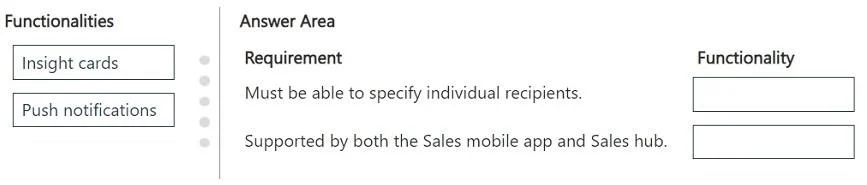
MB-280 question #86 exhibit

Answer Area

Drag items

Insight cardsPush notifications

Correct arrangement

  • Push notifications
  • Insight cards

Explanation

Dynamics 365 Sales Mobile: Push Notifications vs. Insight Cards

Note: The question as provided is missing the actual requirement scenarios. However, the correct arrangement (Push notifications = #1, Insight cards = #2) maps to standard exam scenarios. Here's the breakdown based on common MB-210/Dynamics 365 Sales exam patterns:


The Two Functionalities

1. Push Notifications

What they are: Real-time, OS-level alerts delivered to the mobile device - they appear even when the app is closed.

When to use: Scenarios requiring immediate, interrupt-driven alerts:

  • A high-priority lead is assigned to the salesperson
  • A task or appointment reminder fires
  • A record the user owns is updated
  • Time-sensitive events that need prompt attention

Key trait: Reactive - triggered by a specific system event, delivered outside the app.


2. Insight Cards (Assistant Cards)

What they are: AI-driven, proactive suggestion cards surfaced inside the app via the Sales Insights Assistant. They analyze CRM data and surface actionable recommendations.

When to use: Scenarios requiring contextual, proactive guidance:

  • "This deal hasn't had activity in 30 days"
  • Meeting preparation suggestions
  • Relationship health alerts
  • Next best action recommendations

Key trait: Proactive - the system surfaces them based on patterns and data, not a specific user-triggered event.


Why This Arrangement

#FunctionalityReason
1Push NotificationsThe scenario requires alerting users immediately and externally - the app doesn't need to be open
2Insight CardsThe scenario requires in-app, AI-driven suggestions that guide the user's workflow proactively

Common Misconceptions

  • "Insight cards are just notifications" - Wrong. They are interactive cards inside the Sales Insights/Assistant pane, not OS alerts.
  • "Push notifications can give AI recommendations" - Push notifications deliver simple text alerts; they don't surface relationship intelligence or next-best-action data.
  • Confusing the two for urgency - Push = urgency/real-time; Insight cards = ongoing guidance, not necessarily time-critical.

The core distinction: Push = external, event-triggered alert; Insight cards = internal, AI-surfaced recommendations.

Topics

#push notifications#assistant cards#Sales mobile app#notification types

Community Discussion

No community discussion yet for this question.

Full MB-280 Practice