
MB-280 · Question #94
Drag and Drop Question You are implementing Dynamics 365 Sales for a beverage company. The company sells drinks by individual cans, by the dozen, or by the case of 48 cans as follows: - There are…
The correct answer is Products; Discount Lists; Price Lists; Unit Groups. Dynamics 365 Sales - Product Catalog Setup Explained This question tests your understanding of how the four product catalog components work together in Dynamics 365 Sales. Here's what maps to each entry and why: --- 1. Products Why here: The three drink flavors (strawberry…
Question
Exhibit
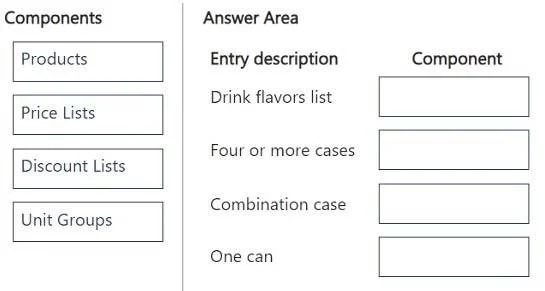
Answer Area
Drag items
Correct arrangement
- Products
- Discount Lists
- Price Lists
- Unit Groups
Explanation
Dynamics 365 Sales - Product Catalog Setup Explained
This question tests your understanding of how the four product catalog components work together in Dynamics 365 Sales. Here's what maps to each entry and why:
1. Products
Why here: The three drink flavors (strawberry, vanilla, chocolate) are individual Products in the catalog. Each SKU - single can, dozen, case, and combination case - is represented as a product record. The combination case (one dozen of each flavor) would be configured as a Product Bundle, which is a subtype of Products. This is the core catalog record that everything else references.
Common mistake: Thinking you need separate catalog types for bundles. Bundles are still Products - just with component products nested inside them.
2. Discount Lists
Why here: The "4 or more cases = 10% off" rule is a quantity-based tier discount. Discount Lists in Dynamics 365 are specifically designed for this pattern - you define quantity thresholds and the corresponding discount percentage or amount. A Discount List is then associated with a Price List Item.
Common mistake: Trying to handle this in the Price List directly. Price Lists store base prices, not conditional volume discounts - Discount Lists are the correct component for tiered quantity rules.
3. Price Lists
Why here: The four distinct price points ($5.00/can, $55.00/dozen, $200.00/case, $160.00/combo case) are configured as Price List Items within a Price List. Each product+unit combination gets its own price list entry. The Discount List from step 2 is attached at the Price List Item level.
Common mistake: Confusing Price Lists with Unit Groups. Price Lists say how much something costs; Unit Groups say what unit it's sold in. Both are needed but serve different roles.
4. Unit Groups
Why here: The company sells in three distinct quantities - individual can, dozen (12), and case (48). A Unit Group defines the base unit and its related units of measure. You'd create one Unit Group (e.g., "Can Units") with:
- Can as the base unit
- Dozen = 12 cans
- Case = 48 cans
This Unit Group is then assigned to the Product records so the system knows what quantities are valid when adding to an order.
Common mistake: Creating separate Unit Groups for each flavor. One Unit Group covers all products that share the same unit structure - all three flavors use the same can/dozen/case hierarchy, so one Unit Group is sufficient.
How They Connect (Setup Order)
Unit Groups → Products → Price Lists → Discount Lists
(define units)  (use units)  (set prices)  (apply volume rules)
You must set up Unit Groups before Products, and Products before Price Lists, because each layer references the one before it. Discount Lists are configured last and attached to Price List Items.
Topics
Community Discussion
No community discussion yet for this question.