
MB-230 · Question #376
Case Study 2 - Lamna Healthcare Background Lamna Healthcare Company provides health care services to communities across the region. The company provides telehealth services only and does not offer…
Sign in or unlock MB-230 to reveal the answer and full explanation for question #376. The question stem and answer options stay visible for context.
Question
Case Study 2 - Lamna Healthcare Background Lamna Healthcare Company provides health care services to communities across the region. The company provides telehealth services only and does not offer in-person appointments. The company has staff that speak English and Spanish. The company is open from 8 AM to midnight Monday through Friday to provide services. Patients can make appointments by calling or using the internet. All appointments are conducted by phone or by using a computer. Current environment. Services Lamna provides two types of appointments: wellness and sick. A doctor and a nurse are scheduled for each sick appointment. A doctor or a nurse are scheduled for wellness appointments. Current environment. Employees General Employees are located in the Pacific and Eastern time zones. Case representatives Case representatives handle incoming calls, provide information to patients for appointments, and schedule follow-up calls with doctors. Case representatives can also help with people who want to chat online. All case representatives work eight-hour shifts. Case representatives typically focus on cases that involve one type of illness. The case representatives may back up others when call volumes are large. Several case representatives speak both Spanish and English. The only company holidays the case representatives have off are New Year's Eve day and New Year's Day. Customer satisfaction and escalation Customer satisfaction representatives monitor all activity and ensure that there is a uniform process for all calls. Case managers schedule shifts and are a point of escalation. Requirements. System and resources Each employee must use the system. Case managers must be users in the system but must not be available for the scheduling rotation or manually assigned. Patients must be offered at least three alternative times to schedule an appointment. Requirements. Cases The system must support live chats, texting, and Twitter. Case representatives must be able to chat, text, and tweet without exiting the system they use to track calls. Case representatives must be able to chat live only with customers whose calls are routed or assigned to them. Managers must be able to monitor all communication as well as add or delete quick replies. Customer satisfaction representatives must be able to read agent scripts and workflows. A live chat must pop up each time someone fills out the form to register for an appointment. The live chat must automatically be sent to the case representative who is best qualified to answer the question. There are two type of queues: regular and escalated. Tickets must be routed to the most qualified representative for the illness. Tickets assigned to a representative must be automatically placed in that representative's queue. Requirements. Chat escalation process Each division must have one manager for escalations. Patients who request an escalation from the website must automatically be routed to a chatbot. The patient will answer predefined questions and will be alerted that someone will call them back. Chat transcripts must be sent to the appropriate manager. Only escalations must go to the chat bot. You must create two types of Omnichannel queues: regular and escalated. Only managers must be able to access the Omnichannel Insights dashboard. Requirements. Managers Managers must be able to review weekly productivity reports for representatives by using Omnichannel Insights dashboards. Managers must be able to monitor patient moods during patients’ conversations with representatives. Managers must be able to determine whether a patient is feeling negative during a live chat with a representative. Requirements. Appointments Representatives must be able to schedule appointments and see everyone's free/busy time during their scheduled working hours. Appointments must be scheduled by representatives in open time slots for nurses and doctors. Nurses and doctors must be booked for 30-minute time slots. Patients must be offered at least three alternative times to schedule an appointment. Requirements. Analytics You must implement Customer Insights to keep track of how well representatives are managing customers’ requests. Analytics must be viewable only in the production environment. You must ensure that only escalation managers can create workspaces and control access to workspaces Case representatives must be rated on knowledge of their primary specialty and their backup specialty. Case representatives must only be able to view workspaces. Managers must be able to review dashboards in the Chat channel to ensure that case representatives are meeting their objectives. Drag and Drop Question You need to set up users with permissions to use the digital messaging channels. Which role should you assign to each user? To answer, drag the appropriate roles to the correct groups of users. Each role may be used once, more than once, or not at all. You may need to drag the split bar between panes or scroll to view content. Answer:
Exhibit
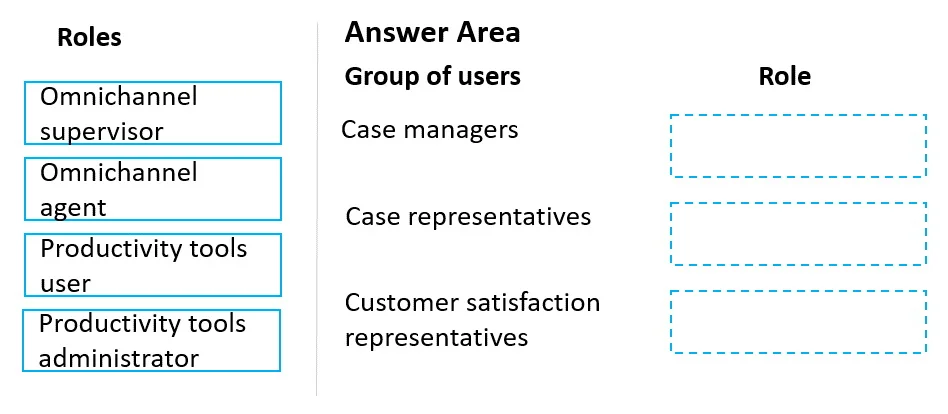
Answer Area
Drag items
Unlock MB-230 to see the answer
You've previewed enough free MB-230 questions. Unlock MB-230 for full answers, explanations, the timed quiz mode, progress tracking, and the master PDF. Question stem and options stay visible so you can still see what's on the exam.