nerdexam
Microsoft

MB-230 · Question #236

Drag and Drop Question You are a Dynamics 365 administrator. You want to set up a child/parent relationship for cases so that the child case inherits different fields from the parent case. You need…

The correct answer is Choose Service Management from Settings; Choose Parent and Child case settings; Select the attributes that the child case will inherit from the parent. Dynamics 365: Parent/Child Case Relationship Setup The Correct Path (Why This Order) The three steps follow a navigation drill-down - each step is a prerequisite to reaching the next screen. You cannot skip levels. --- Step-by-Step Breakdown 1. Choose Service Management from…

Manage cases in Customer Service

Question

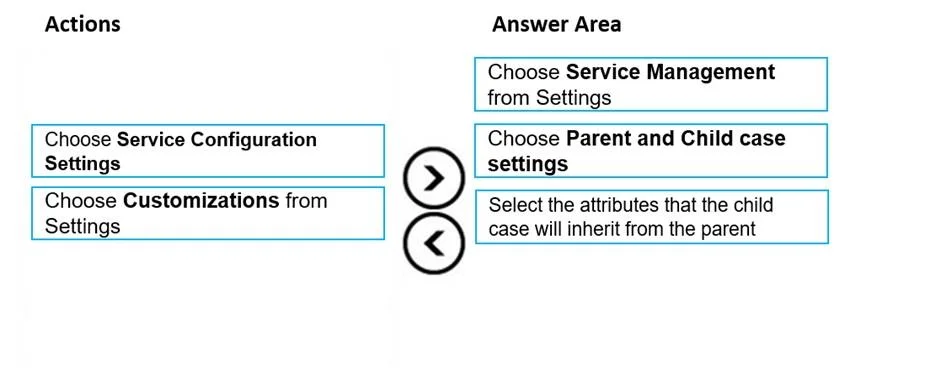
Drag and Drop Question You are a Dynamics 365 administrator. You want to set up a child/parent relationship for cases so that the child case inherits different fields from the parent case. You need to set up the appropriate child/parent relationship. Which three actions should you perform in sequence? To answer, move the appropriate actions from the list of actions to the answer area and arrange them in the correct order. Answer:

Exhibit
MB-230 question #236 exhibit

Answer Area

Drag items

Select the attributes that the child case will inherit from the parentChoose Service Configuration SettingsChoose Customizations from SettingsChoose Service Management from SettingsChoose Parent and Child case settings

Correct arrangement

  • Choose Service Management from Settings
  • Choose Parent and Child case settings
  • Select the attributes that the child case will inherit from the parent

Explanation

Dynamics 365: Parent/Child Case Relationship Setup

The Correct Path (Why This Order)

The three steps follow a navigation drill-down - each step is a prerequisite to reaching the next screen. You cannot skip levels.


Step-by-Step Breakdown

1. Choose Service Management from Settings

  • Why first: "Service Management" is the top-level module within Dynamics 365 Settings that contains all case-related configuration. It is the entry point to case management features.
  • Why not "Service Configuration Settings" or "Customizations": Those are different areas entirely. "Customizations" is for entity/form-level schema changes, not functional service behavior. "Service Configuration Settings" does not exist as a named area for this workflow.

2. Choose Parent and Child case settings

  • Why second: Once inside Service Management, "Parent and Child case settings" is a specific menu item that opens the inheritance configuration page. You must be in Service Management first before this option is accessible.
  • Why not earlier: This option simply doesn't exist at the top Settings level - it lives inside Service Management.

3. Select the attributes that the child case will inherit from the parent

  • Why last: This is the actual configuration action performed on the Parent and Child case settings page. You're choosing which fields (e.g., Customer, Product, Priority) the child case copies from the parent upon creation.
  • Why not earlier: There is no attribute selection screen until you've navigated to the correct settings page.

Common Mistakes

MistakeWhy It's Wrong
Choosing "Customizations from Settings"This is for entity/field schema - not case inheritance behavior
Choosing "Service Configuration Settings"This is a distractor; not the correct navigation node for this task
Reversing steps 1 and 2Step 2 is a child menu of step 1 - physically impossible to reach it first

Key Takeaway

The pattern is: Settings → Service Management → Parent and Child case settings → configure attributes. Think of it as navigating a file system - you must open the folder before you can touch the file inside.

Topics

#parent-child cases#case inheritance#service management#case configuration

Community Discussion

No community discussion yet for this question.

Full MB-230 Practice