
FCSS_SDW_AR-7.4 · Question #21
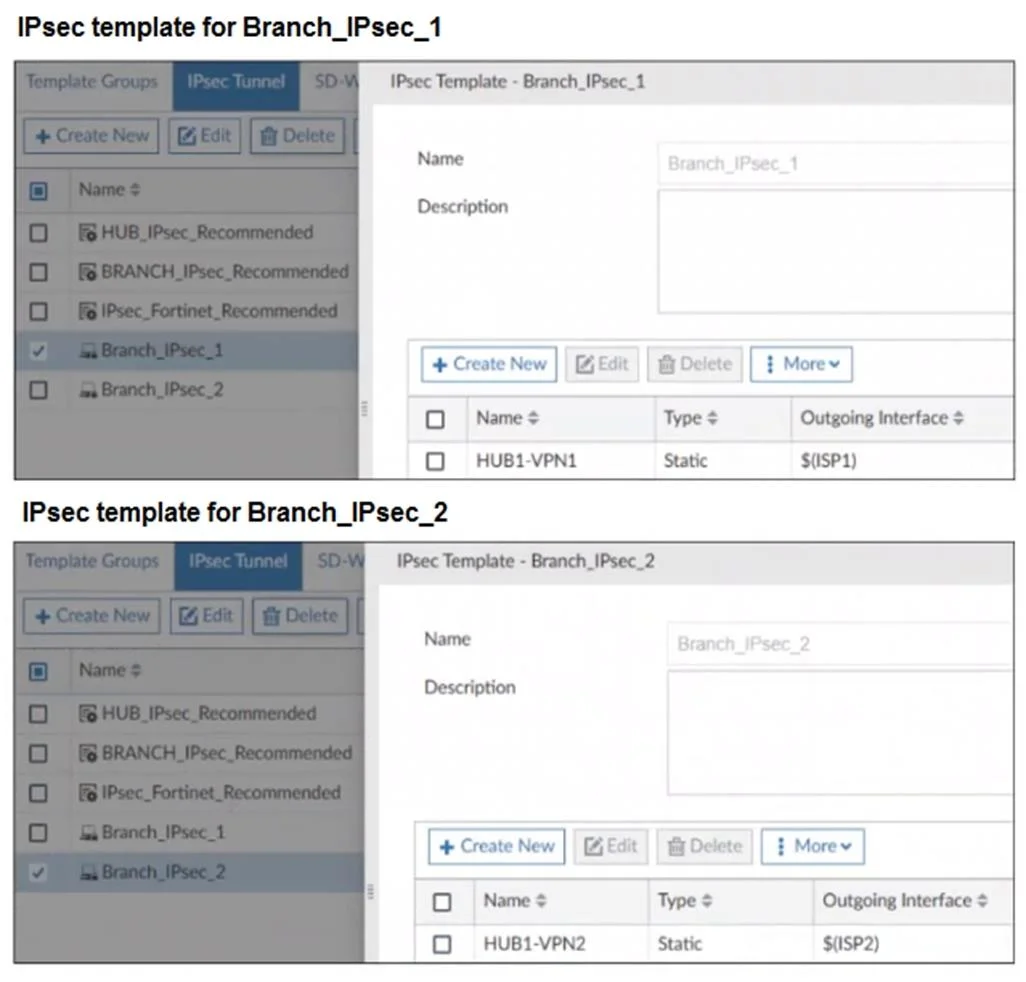
Refer to the exhibits. The exhibits show two IPsec templates to define Branch IPsec 1 and Branch_IPsec_2. Each template defines a VPN tunnel. The error message that FortiManager displayed when the…
The correct answer is B. You can assign only one IPsec template to each FortiGate device. FortiManager allows only one IPsec template to be assigned per FortiGate device. The error indicates a conflicting template assignment, meaning assigning both Branch_IPsec_1 and Branch_IPsec_2 to the same device (branch1_fgt) is not permitted.
Question
Refer to the exhibits. The exhibits show two IPsec templates to define Branch IPsec 1 and Branch_IPsec_2. Each template defines a VPN tunnel. The error message that FortiManager displayed when the administrator tried to assign the second template to the FortiGate device is also shown. Which statement best describes the cause of the issue?
Exhibits

Options
- AYou can assign only one template with a tunnel type of static to each FortiGate device.
- BYou can assign only one IPsec template to each FortiGate device.
- CYou should review the branch1_fgt configuration for configured tunnels in the rootVDOM.
- DYou should use the same outgoing interface of both templates.
How the community answered
(46 responses)- A7% (3)
- B72% (33)
- C17% (8)
- D4% (2)
Explanation
FortiManager allows only one IPsec template to be assigned per FortiGate device. The error indicates a conflicting template assignment, meaning assigning both Branch_IPsec_1 and Branch_IPsec_2 to the same device (branch1_fgt) is not permitted.
Topics
Community Discussion
No community discussion yet for this question.