
FCSS_SDW_AR-7.4 · Question #77
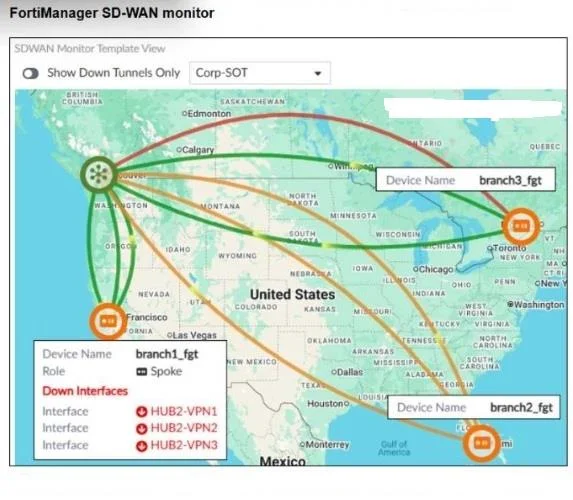
Refer to the exhibit. To check the status of an SD-WAN topology using the FortiManager SD- WAN monitor menus, you place your mouse next to branch1_fgt and receive the output shown in the exhibit…
The correct answer is B. The template Corp-SOT defines a single-hub topology. In the SD-WAN monitor “Template View: Corp-SOT” you see a single hub icon with multiple spokes. That visualization corresponds to a single-hub topology. The pop-up for branch1_fgt listing HUB2-VPN1/2/3 as Down Interfaces simply shows secondary (to a would-be Hub2) tunnels are…
Question
Refer to the exhibit. To check the status of an SD-WAN topology using the FortiManager SD- WAN monitor menus, you place your mouse next to branch1_fgt and receive the output shown in the exhibit. Which conclusion can you draw from the output shown in the exhibit?
Exhibit
Options
- Abranch3_fgt is configured with three SD-WAN overlay tunnels and one is dead.
- BThe template Corp-SOT defines a single-hub topology.
- CThree tunnels of branch2_fgt are out of SLA.
- DThe three spokes have tunnels that are out of SLA.
How the community answered
(33 responses)- A3% (1)
- B70% (23)
- C18% (6)
- D9% (3)
Explanation
In the SD-WAN monitor “Template View: Corp-SOT” you see a single hub icon with multiple spokes. That visualization corresponds to a single-hub topology. The pop-up for branch1_fgt listing HUB2-VPN1/2/3 as Down Interfaces simply shows secondary (to a would-be Hub2) tunnels are down, but only one hub is actually defined/active in this template view.
Topics
Community Discussion
No community discussion yet for this question.