
FCSS_SDW_AR-7.4 · Question #28
Refer to the exhibits. You use FortiManager to manage the branch devices and configure the SD- WAN template. You have configured direct internet access (DIA) for the IT department users. Now. you…
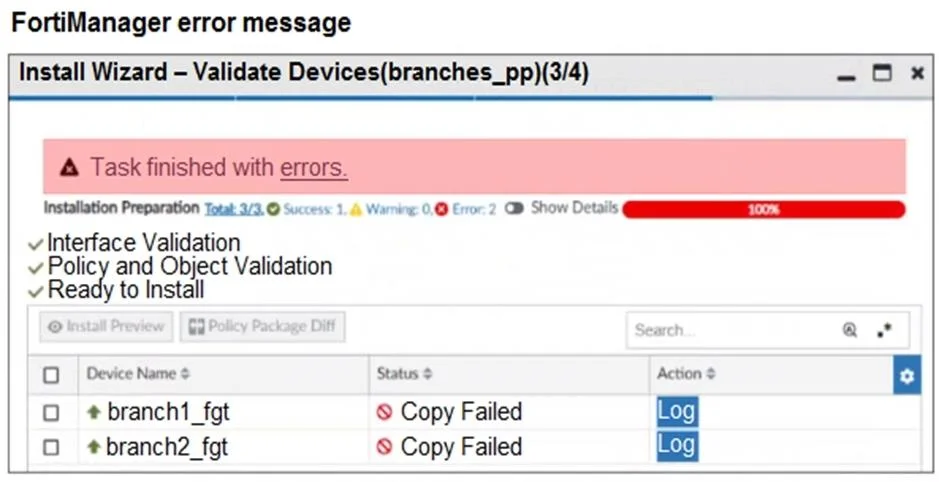
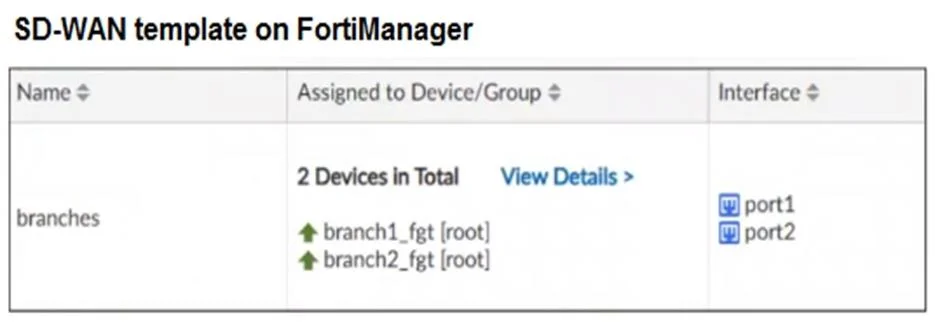
The correct answer is C. You cannot install firewall policies that reference an SD-WAN member. In FortiManager, firewall policies must reference SD-WAN zones, not individual SD-WAN members (interfaces like port1 or port2). The SIA rule incorrectly references port1, which is a member - not a zone - causing the installation failure during validation.
Question
Refer to the exhibits. You use FortiManager to manage the branch devices and configure the SD- WAN template. You have configured direct internet access (DIA) for the IT department users. Now. you must configure secure internet access (SIA) for all local LAN users and have set the firewall policies as shown in the second exhibit. Then, when you use the install wizard to install the configuration and the policy package on the branch devices, FortiManager reports an error as shown in the third exhibit. Which statement describes why FortiManager could not install the configuration on the branches?
Exhibits

Options
- AYou must direct SIA traffic to a VPN tunnel.
- BYou cannot install firewall policies that reference an SD-WAN zone.
- CYou cannot install firewall policies that reference an SD-WAN member.
- DYou cannot install SIA and DIA rules on the same device.
How the community answered
(24 responses)- A4% (1)
- B8% (2)
- C83% (20)
- D4% (1)
Explanation
In FortiManager, firewall policies must reference SD-WAN zones, not individual SD-WAN members (interfaces like port1 or port2). The SIA rule incorrectly references port1, which is a member - not a zone - causing the installation failure during validation.
Topics
Community Discussion
No community discussion yet for this question.