
AZ-800 · Question #9
Case Study 1 - Fabrikam, Inc Overview Fabrikam, Inc is a manufacturing company that has a main office in New York and a branch office in Seattle. Existing Environment On-premises Servers The…
The correct answer is An ExpressRoute gateway; An ExpressRoute circuit connection. The question requires selecting the correct steps to implement a Group Managed Service Account (gMSA) for an on-premises IIS application that runs on multiple servers, replacing individual domain user accounts.
Question
Exhibit
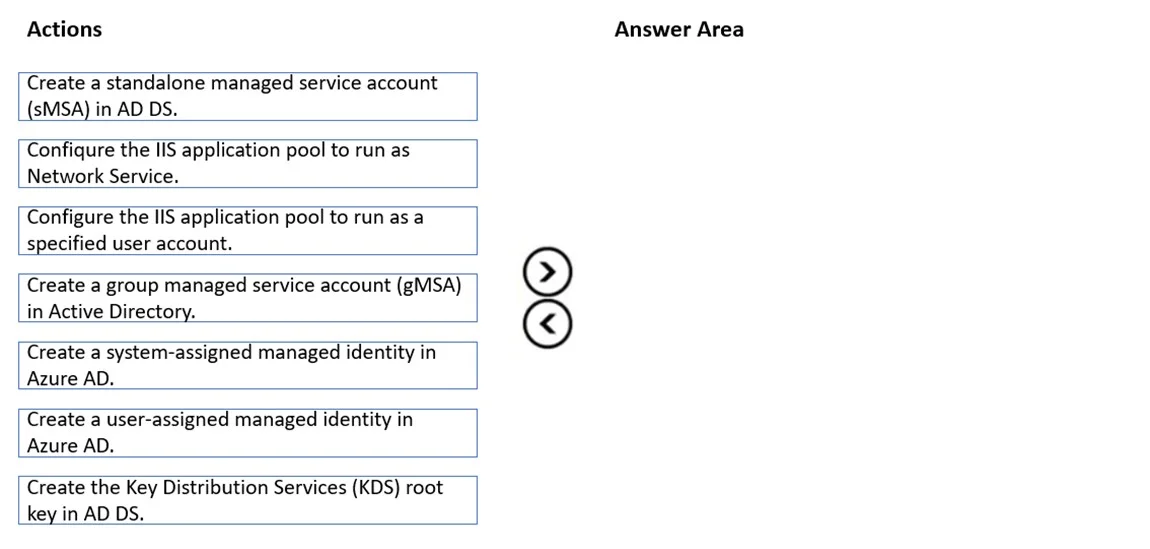
Answer Area
Drag items
Correct arrangement
- An ExpressRoute gateway
- An ExpressRoute circuit connection
Explanation
The question requires selecting the correct steps to implement a Group Managed Service Account (gMSA) for an on-premises IIS application that runs on multiple servers, replacing individual domain user accounts.
Approach. The scenario implies a need to modernize service account management for the on-premises IIS application 'Webapp1' running on multiple servers (WEB1 and WEB2), replacing existing individual domain user accounts. Group Managed Service Accounts (gMSAs) are the ideal solution for this multi-server scenario, providing automatic password management and simplified service principal name (SPN) management. The correct interaction involves dragging the following three actions into the 'Answer Area':
- 'Create the Key Distribution Services (KDS) root key in AD DS': This is a mandatory one-time prerequisite for enabling gMSAs in an Active Directory domain. Without the KDS root key, gMSAs cannot be created or used.
- 'Create a group managed service account (gMSA) in Active Directory': This step creates the actual gMSA object in Active Directory. When creating the gMSA, you specify which host servers (e.g., WEB1 and WEB2) are allowed to retrieve its password.
- 'Configure the IIS application pool to run as a specified user account': After the gMSA is created, the IIS application pool must be configured to use this gMSA as its identity. The gMSA is specified as a 'specified user account' in the format
Domain\gMSAName$(e.g.,corp\Webapp1GMSA$). This allows the application pool to leverage the benefits of the gMSA, including automatic password management and delegation.
Common mistakes.
- common_mistake. - 'Configure the IIS application pool to run as Network Service': While a valid option for IIS application pools, the Network Service account is a built-in local account with limited network access privileges and does not offer the benefits of a managed service account (like gMSA's automatic password management or multi-server support for network resource access). It does not fulfill the implied goal of migrating to a modern, secure managed identity for an application requiring network access across multiple servers. The second exhibit image shows this item incorrectly placed in the 'Answer Area'.
- 'Create a standalone managed service account (sMSA) in AD DS': sMSAs are designed for services running on a single server. Since Webapp1 runs on two servers (WEB1 and WEB2), a gMSA is the appropriate choice for a shared identity across multiple hosts.
- 'Create a system-assigned managed identity in Azure AD' / 'Create a user-assigned managed identity in Azure AD': These options are for managing identities for applications or services hosted in Azure. The scenario clearly describes an on-premises IIS application running on physical or virtual servers within Fabrikam's on-premises AD DS environment, making Azure AD managed identities irrelevant here.
- Not selecting all three required steps: Omitting the KDS root key creation or the final configuration of the application pool would lead to an incomplete or non-functional gMSA implementation.
Concept tested. This question primarily tests the understanding of Active Directory Group Managed Service Accounts (gMSAs) - their purpose, prerequisites (KDS root key), creation, and how to implement them for services like IIS in a multi-server on-premises environment. It also tests the ability to differentiate between various types of service identities (gMSA, sMSA, Network Service, traditional user accounts, Azure AD managed identities) and choose the most appropriate one for a given scenario.
Community Discussion
No community discussion yet for this question.