
AZ-800 · Question #132
Drag and Drop Question You deploy a single-domain Active Directory Domain Services (AD DS) forest named contoso.com. You deploy a server to the domain and configure the server to run a service. You…
The correct answer is Add-KdsRootKey; New-ADServiceAccount; Install-ADServiceAccount. To enable a service to use a group managed service account (gMSA), the Key Distribution Service (KDS) root key must be created, followed by the gMSA object in Active Directory, and finally, the gMSA must be installed on the target server.
Question
Drag and Drop Question You deploy a single-domain Active Directory Domain Services (AD DS) forest named contoso.com. You deploy a server to the domain and configure the server to run a service. You need to ensure that the service can use a group managed service account (gMSA) to authenticate. Which three PowerShell cmdlets should you run in sequence? To answer, move the appropriate cmdlets from the list of cmdlets to the answer area and arrange them in the correct order. Answer:
Exhibit
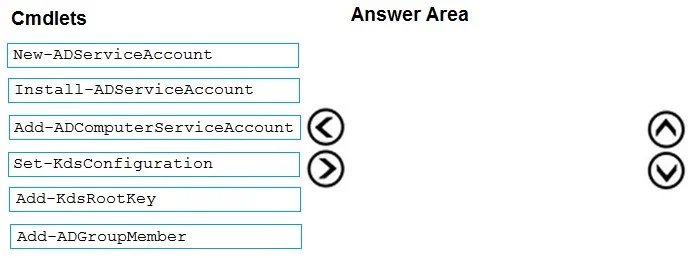
Answer Area
Drag items
Correct arrangement
- Add-KdsRootKey
- New-ADServiceAccount
- Install-ADServiceAccount
Explanation
To enable a service to use a group managed service account (gMSA), the Key Distribution Service (KDS) root key must be created, followed by the gMSA object in Active Directory, and finally, the gMSA must be installed on the target server.
Approach. The correct interaction involves dragging the three cmdlets 'Add-KdsRootKey', 'New-ADServiceAccount', and 'Install-ADServiceAccount' from the 'Cmdlets' list to the 'Answer Area' and arranging them in the following sequence: 1. Add-KdsRootKey, 2. New-ADServiceAccount, 3. Install-ADServiceAccount. This sequence is necessary to deploy a group managed service account (gMSA):
- Add-KdsRootKey: This cmdlet must be run first to create the Microsoft Key Distribution Service (KDS) root key. This key is a prerequisite for gMSAs because it allows domain controllers to generate passwords for the gMSAs. Without it, gMSAs cannot function.
- New-ADServiceAccount: After the KDS root key is established, this cmdlet is used to create the gMSA object in Active Directory. When creating the gMSA, you specify properties like its name and which computers are authorized to retrieve its password (using the -PrincipalsAllowedToRetrieveManagedPassword parameter).
- Install-ADServiceAccount: Finally, this cmdlet is run on the target server where the service will run to install the gMSA. This makes the gMSA available to services on that particular server, allowing them to use it for authentication.
Common mistakes.
- common_mistake. Other cmdlets listed are incorrect or not part of the core gMSA deployment sequence:
- Add-ADComputerServiceAccount: This cmdlet does not exist in Active Directory PowerShell modules. It appears to be a fabricated option.
- Set-KdsConfiguration: This cmdlet is used to modify existing KDS configuration settings, such as the secret algorithm or validity period, after the root key has been created. It is not used for the initial creation of the KDS root key.
- Add-ADGroupMember: This cmdlet is used to add members to Active Directory security or distribution groups. While gMSAs can be associated with security groups for permissions, adding a gMSA directly to a group using this cmdlet is not part of the primary gMSA creation and deployment process.
- A common mistake is to skip 'Add-KdsRootKey' or place it out of sequence, which would prevent the gMSA from functioning correctly.
Concept tested. Active Directory Group Managed Service Accounts (gMSA) deployment and configuration, including the prerequisites (KDS root key) and the cmdlets used for creation and installation.
Topics
Community Discussion
No community discussion yet for this question.