
AZ-800 · Question #124
SIMULATION You need to configure a Group Policy preference to ensure that users in the organizational unit (OU) named Server Admins have a shortcut to a folder named \\srv1.contoso.com\data on their…
The correct answer is A. Create Desktop Shortcuts on Domain Computers via GPO. To create a desktop shortcut for users in the Server Admins OU to a shared folder, a Group Policy Preference (GPP) for shortcuts must be configured and linked to the Server Admins OU.
Question
SIMULATION You need to configure a Group Policy preference to ensure that users in the organizational unit (OU) named Server Admins have a shortcut to a folder named \srv1.contoso.com\data on their desktop when they sign in to the computers in the domain. To complete this task, sign in the required computer or computers. Answer:
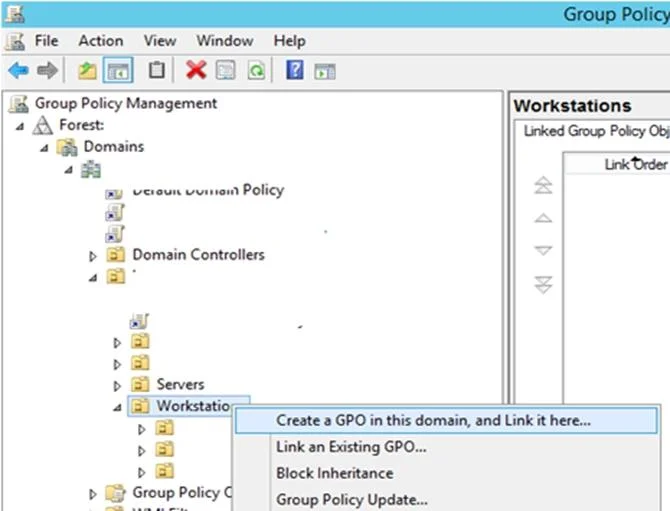
Create Desktop Shortcuts on Domain Computers via GPO. Step 1: Open the Group Policy Management Console (gpmc.msc). Step 2: Right-click an AD container (Organizational Unit) you want to apply a shortcut creation policy. In this case right-click on the OU Server Admins. Step 3: Select Create a GPO in this domain, and Link it here.. Step 4: Go to the Group Policy Preferences section: User Configuration –> Preferences -> Windows Settings -> Shortcuts. Click it and select New -> Shortcut; Step 5: Create a new shortcut item with the following settings:
Name: Something Target Type: File System Object (you can select a URL or a Shell object here) Location: Desktop Target Path: \srv1.contoso.com\data Reference:
Exhibit
Options
- ACreate Desktop Shortcuts on Domain Computers via GPO
How the community answered
(20 responses)- A100% (20)
Why each option
To create a desktop shortcut for users in the Server Admins OU to a shared folder, a Group Policy Preference (GPP) for shortcuts must be configured and linked to the Server Admins OU.
Group Policy Preferences (GPPs) allow administrators to configure various user and computer settings, including creating shortcuts. By creating a GPO, navigating to User Configuration - Preferences - Windows Settings - Shortcuts, and linking this GPO to the Server Admins OU, users in that OU will receive the specified desktop shortcut upon signing in.
Concept tested: Group Policy Preferences for shortcuts
Source: https://learn.microsoft.com/en-us/previous-versions/windows/it-pro/windows-server-2012-r2-and-2012/dn789196(v=ws.11)
Topics
Community Discussion
No community discussion yet for this question.