
AZ-800 · Question #85
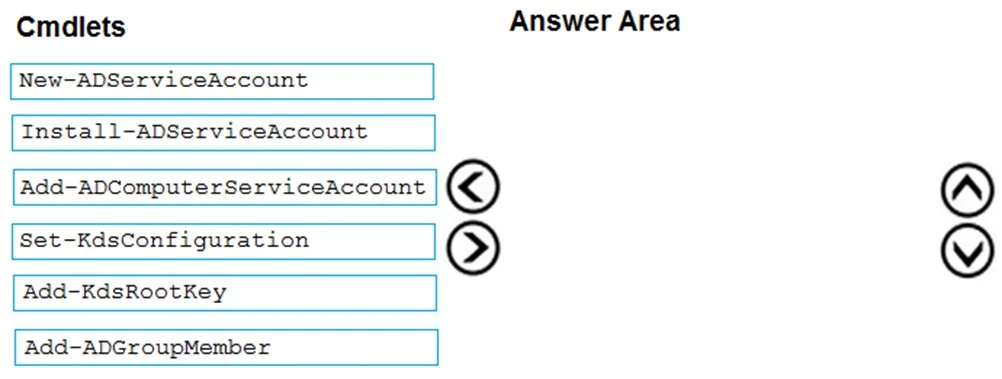
Drag and Drop Question You deploy a single-domain Active Directory Domain Services (AD DS) forest named contoso.com. You deploy five servers to the domain. You add the servers to a group named…
The correct answer is Add-KdsRootKey; New-ADServiceAccount; Install-ADServiceAccount. To enable group managed service accounts (gMSAs) for an NLB cluster, the Key Distribution Service (KDS) Root Key must first be created, then the gMSA is provisioned, and finally, it is installed on the cluster nodes.
Question
Exhibit
Answer Area
Drag items
Correct arrangement
- Add-KdsRootKey
- New-ADServiceAccount
- Install-ADServiceAccount
Explanation
To enable group managed service accounts (gMSAs) for an NLB cluster, the Key Distribution Service (KDS) Root Key must first be created, then the gMSA is provisioned, and finally, it is installed on the cluster nodes.
Approach. The correct interaction is to drag the following three cmdlets into the 'Answer Area' in the specified order:
-
Add-KdsRootKey: This is the first step because Group Managed Service Accounts (gMSAs) rely on the Microsoft Key Distribution Service (KDS) for secure key generation. The KDS Root Key must be present in the Active Directory forest before any gMSA can be created. This cmdlet creates the necessary root key. While there's a default 10-hour waiting period for the key to propagate, for exam purposes, it's assumed to be available immediately after creation for subsequent steps.
-
New-ADServiceAccount: After the KDS Root Key is established, the next step is to create the gMSA itself. This cmdlet provisions the gMSA object in Active Directory. For the scenario, this would be used to create 'NLBCluster' and, importantly, the 'PrincipalsAllowedToRetrieveManagedPassword' parameter would be set to 'ITFarmHosts' (the group containing the NLB servers) to authorize them to retrieve the gMSA's password.
-
Install-ADServiceAccount: Finally, for the NLB service on each server node to actually use the gMSA, the gMSA needs to be installed on those specific servers. This cmdlet makes the gMSA available to services running on the local machine. This command would be executed on each of the five servers in the 'ITFarmHosts' group.
Common mistakes.
- common_mistake. Other choices are incorrect for the following reasons:
- Add-ADComputerServiceAccount: This cmdlet does not exist in Active Directory PowerShell. It's a plausible-sounding but non-existent command.
- Set-KdsConfiguration: This cmdlet is used to modify existing KDS configuration settings (like key expiration or minimum length), not to create the initial KDS Root Key.
- Add-ADGroupMember: While the servers are members of 'ITFarmHosts', adding them to this group is a prerequisite to allowing them to use the gMSA (via
PrincipalsAllowedToRetrieveManagedPasswordduringNew-ADServiceAccount), not a direct step in the gMSA creation and installation sequence itself. The question focuses on the gMSA configuration steps. - Using
New-ADServiceAccountbeforeAdd-KdsRootKeywould fail because the KDS Root Key is a prerequisite for gMSA creation. - Installing the service account (
Install-ADServiceAccount) before creating it (New-ADServiceAccount) is illogical, as there would be no service account to install.
Concept tested. Active Directory Group Managed Service Accounts (gMSA) creation and deployment, including the prerequisites (KDS Root Key), provisioning, and installation.
Topics
Community Discussion
No community discussion yet for this question.