
AZ-800 · Question #84
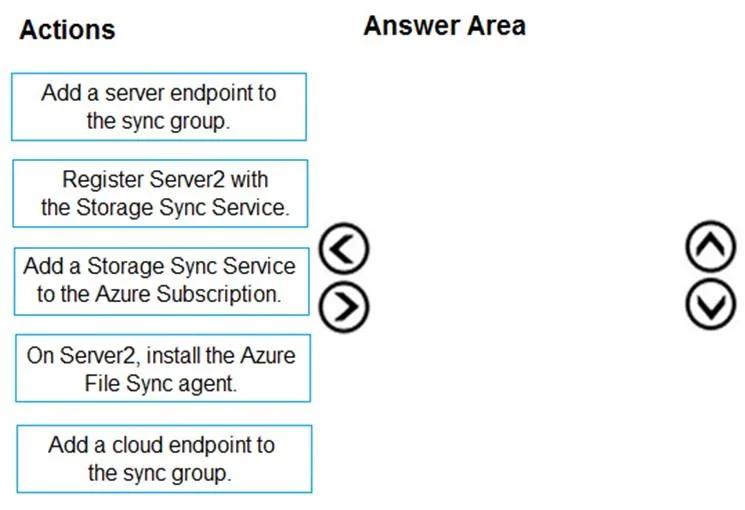
Drag and Drop Question You have two on-premises servers named Server1 and Server2 that run Windows Server. You have an Azure Storage account named storage1 that contains a file share named share1…
The correct answer is On Server2, install the Azure File Sync agent.; Register Server2 with the Storage Sync Service.; Add a server endpoint to the sync group. To add Server2 to an existing Azure File Sync setup, you must first install the Azure File Sync agent, then register the server, and finally add it as a server endpoint to the sync group.
Question
Exhibit
Answer Area
Drag items
Correct arrangement
- On Server2, install the Azure File Sync agent.
- Register Server2 with the Storage Sync Service.
- Add a server endpoint to the sync group.
Explanation
To add Server2 to an existing Azure File Sync setup, you must first install the Azure File Sync agent, then register the server, and finally add it as a server endpoint to the sync group.
Approach. The scenario describes an existing Azure File Sync setup where Server1 is already syncing with an Azure file share (share1) within an Azure Storage account (storage1). The goal is to configure Server2 to also sync with share1. This implies that a Storage Sync Service, a sync group, and a cloud endpoint (share1) already exist.
The correct sequence of actions to add an additional on-premises server (Server2) to an existing Azure File Sync sync group is as follows:
- On Server2, install the Azure File Sync agent. - The agent is a prerequisite software that must be installed on any Windows Server that will participate in Azure File Sync. It enables the server to communicate with the Azure File Sync service.
- Register Server2 with the Storage Sync Service. - After the agent is installed, the server needs to be registered with an existing Storage Sync Service in Azure. This step establishes a trust relationship and makes the server visible as a 'Registered server' resource within the Storage Sync Service.
- Add a server endpoint to the sync group. - Once Server2 is registered, a specific path on Server2 can be designated as a server endpoint and added to the existing sync group that already contains the cloud endpoint (share1) and Server1's server endpoint. This initiates synchronization for Server2.
Common mistakes.
- common_mistake. Other options are incorrect for the following reasons:
- 'Add a Storage Sync Service to the Azure Subscription.' is wrong because the scenario explicitly states that Server1 is already syncing with share1 using Azure File Sync. This implies an Azure File Sync Storage Sync Service already exists and is in use. There's no need to create a new one just to add another server to an existing setup.
- 'Add a cloud endpoint to the sync group.' is wrong because share1 is already the designated cloud endpoint, as Server1 is syncing with it. We are adding another server endpoint to the existing sync group, not a new cloud share.
- Attempting to 'Register Server2 with the Storage Sync Service.' before installing the agent would fail, as the agent provides the necessary components for registration.
- Attempting to 'Add a server endpoint to the sync group.' before the server is registered would also fail, as the server must first be a 'Registered server' to be eligible for adding as an endpoint.
Concept tested. Azure File Sync deployment steps, specifically adding an additional server to an existing synchronization topology, understanding the roles of the Azure File Sync agent, server registration, and server endpoints within a sync group.
Reference. null
Topics
Community Discussion
No community discussion yet for this question.