
AZ-800 · Question #223
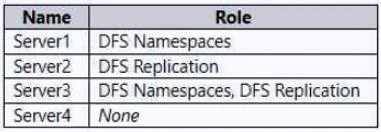
Your network contains an Active Directory Domain Services (AD DS) domain named contoso.com. The domain contains the servers shown in the following table. You need to create a Distributed File System…
The correct answer is C. Server1 and Server3 only. Server1 and Server3 are the only suitable choices for DFS folder targets because they are Windows Server 2022 instances with the Distributed File System (DFS) role installed.
Question
Your network contains an Active Directory Domain Services (AD DS) domain named contoso.com. The domain contains the servers shown in the following table. You need to create a Distributed File System (DFS) namespace that will contain the following:
- A domain-based namespace named \contoso.com\Public
- A folder named Finance
Which servers can you configure as folder targets for the Finance folder?
Exhibit
Options
- AServer3 only
- BServer2 and Server3 only
- CServer1 and Server3 only
- DServer1, Server2, and Server3 only
- EServer1, Server2, Server3, and Server4
How the community answered
(37 responses)- A8% (3)
- B11% (4)
- C78% (29)
- E3% (1)
Why each option
Server1 and Server3 are the only suitable choices for DFS folder targets because they are Windows Server 2022 instances with the Distributed File System (DFS) role installed.
Server3 only is incorrect as Server1 also meets the technical requirements for a DFS folder target.
Server2 and Server3 only is incorrect because Server2 lacks the Distributed File System (DFS) role.
Server1 and Server3 are Windows Server 2022 instances with the Distributed File System (DFS) role installed, making them capable of hosting shared folders that can serve as folder targets for a DFS namespace. The presence of the DFS role indicates they are properly configured for DFS services.
Server1, Server2, and Server3 only is incorrect because Server2 does not have the DFS role installed.
Server1, Server2, Server3, and Server4 is incorrect because Server2 lacks the DFS role and Server4 runs a client operating system (Windows 10), which is typically not used for domain-based DFS folder targets.
Concept tested: DFS Namespace folder target requirements
Source: https://learn.microsoft.com/en-us/windows-server/storage/dfs-namespaces/dfs-overview
Topics
Community Discussion
No community discussion yet for this question.