
AZ-800 · Question #222
SIMULATION You need to make the shares named Marketing and Sales from SRV1 available on the network by using the following UNC paths: - \\contoso.com\documents\marketing…
The correct answer is C. Server1 and Server3 only. Option C is correct because completing this DFS (Distributed File System) namespace task requires action on exactly two machines: Server1 (SRV1), where the actual Marketing and Sales shares are hosted and must be confirmed/created, and Server3, which serves as the DFS namespace…
Question
SIMULATION You need to make the shares named Marketing and Sales from SRV1 available on the network by using the following UNC paths:
- \contoso.com\documents\marketing
- \contoso.com\documents\sales
To complete this task, sign in to the required computer or computers. Answer:
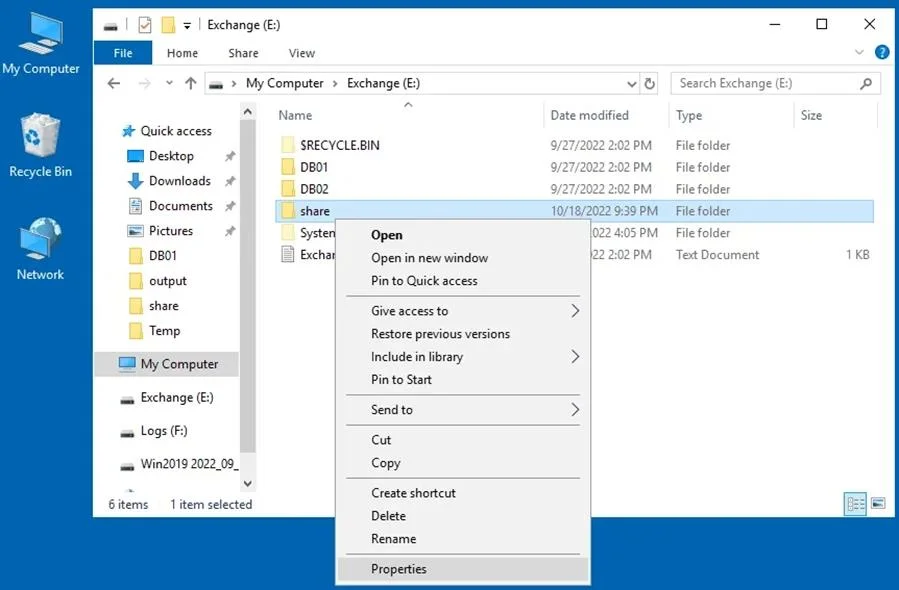
How to Set Up Windows Server for File Sharing Windows File Sharing Setup Step 1: Open the Computer Management window, which you can access by going to Server Manager > Tools > Computer Management. Open SRV1. Step 2: Select the directory that you want to share (or select a new directory). We select: \contoso.com\documents\marketing Step 3: Right-click this directory (folder) and in the context menu, hit Properties. Step 4: Specify name of the Share as Marketing Step 5: Share \contoso.com\documents\sales as Sales in the same manner. Reference:
Exhibit
Options
- AServer3 only
- BServer2 and Server3 only
- CServer1 and Server3 only
- DServer1, Server2, and Server3 only
- EServer1, Server2, Server3, and Server4
How the community answered
(38 responses)- A3% (1)
- B13% (5)
- C74% (28)
- D8% (3)
- E3% (1)
Explanation
Option C is correct because completing this DFS (Distributed File System) namespace task requires action on exactly two machines: Server1 (SRV1), where the actual Marketing and Sales shares are hosted and must be confirmed/created, and Server3, which serves as the DFS namespace server where the \\contoso.com\documents namespace is configured to map those UNC paths to the physical shares on SRV1.
Why the distractors fail:
- A (Server3 only) is wrong because you can't configure DFS folder targets without the underlying shares already existing on Server1.
- B (Server2 and Server3) is wrong because it swaps Server1 for Server2 - Server2 has no role here, as the shares live on SRV1/Server1.
- D (Server1, Server2, and Server3) adds Server2 unnecessarily - it plays no part in either share hosting or namespace management.
- E (all four servers) is wrong for the same reason D is wrong, multiplied - neither Server2 nor Server4 are involved.
Memory tip: DFS namespace tasks always require two stops - the file server (where shares physically live) and the namespace server (where the friendly UNC path is defined). Identify those two roles in the scenario, and you've identified which servers to sign into.
Topics
Community Discussion
No community discussion yet for this question.