
AZ-800 · Question #292
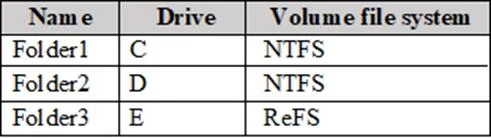
You have an on-premises server that runs Windows Server and contains the folders shown in the following table. You have an Azure subscription. You plan to implement Azure File Sync. Which folders…
The correct answer is A. Folder1 and Folder2 only. Azure File Sync has specific requirements for server endpoints. A server endpoint cannot reside on the system volume (the volume hosting the Windows OS, typically C:\). Folder3 is most likely located on the system volume (e.g., C:\Folder3), which disqualifies it-Azure File Sync…
Question
You have an on-premises server that runs Windows Server and contains the folders shown in the following table. You have an Azure subscription. You plan to implement Azure File Sync. Which folders can be added as Azure File Sync server endpoints?
Exhibit
Options
- AFolder1 and Folder2 only
- BFolder1, Folder2, and Folder3
- CFolder1 only
- DFolder2 and Folder3 only
- EFolder3 only
- FFolder2 only
How the community answered
(46 responses)- A72% (33)
- C7% (3)
- D2% (1)
- E4% (2)
- F15% (7)
Explanation
Azure File Sync has specific requirements for server endpoints. A server endpoint cannot reside on the system volume (the volume hosting the Windows OS, typically C:). Folder3 is most likely located on the system volume (e.g., C:\Folder3), which disqualifies it-Azure File Sync explicitly blocks sync endpoints on the system volume to prevent OS file conflicts. Folder1 and Folder2 reside on non-system NTFS volumes and meet all requirements: they are not reparse points, not in the Windows directory, and are on supported volume types.
Topics
Community Discussion
No community discussion yet for this question.