
AZ-800 · Question #302
Note: This section contains one or more sets of questions with the same scenario and problem. Each question presents a unique solution to the problem. You must determine whether the solution meets…
The correct answer is A. Yes. The proposed solution meets the goal because it correctly places ADMX template files into the central store, enabling the GPO editor to display all available policy settings.
Question
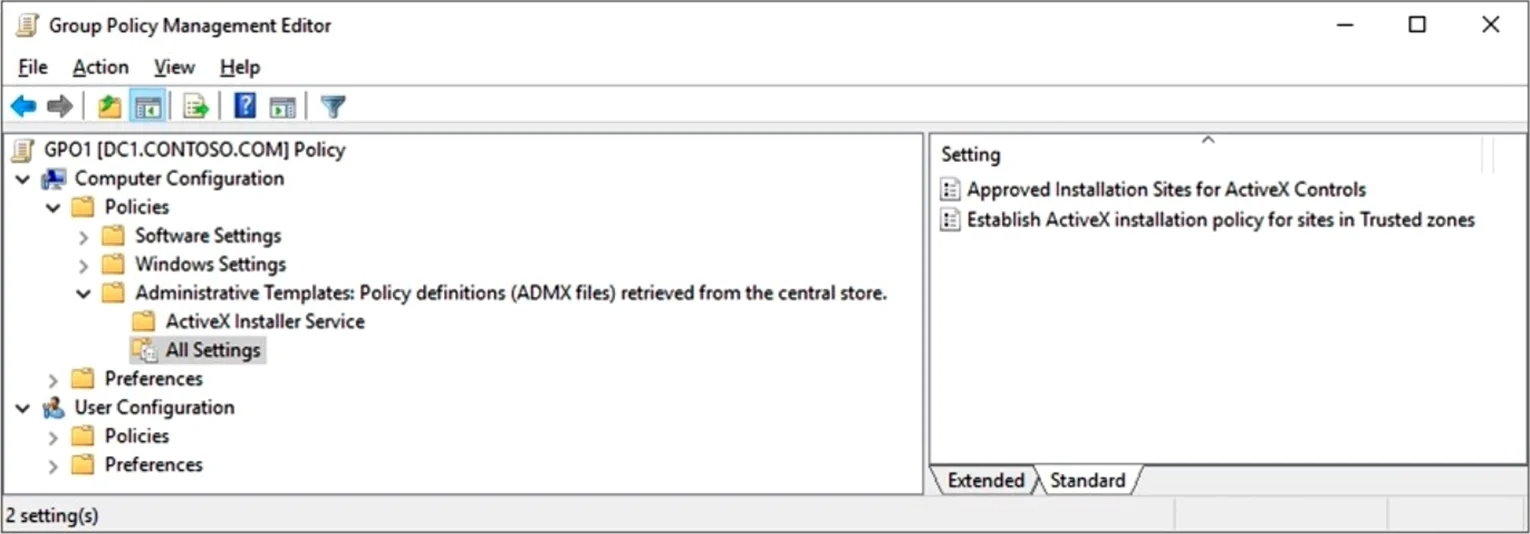
Note: This section contains one or more sets of questions with the same scenario and problem. Each question presents a unique solution to the problem. You must determine whether the solution meets the stated goals. More than one solution in the set might solve the problem. It is also possible that none of the solutions in the set solve the problem. After you answer a question in this section, you will NOT be able to return. As a result, these questions do not appear on the Review Screen. Your network contains an Active Directory Domains Services (AD DS) domain named contoso.com. You implement a central store. You create a new Group Policy Object (GPO) named GPO1. When you attempt to edit GPO1, you see the settings shown in the exhibit. (Click the Exhibit tab.) You need to ensure that all settings are available. Solution: You copy the contents of the C:\Windows\PolicyDefinitions folder to the central store. Does this meet the goal?
Exhibit
Options
- AYes
- BNo
How the community answered
(24 responses)- A88% (21)
- B13% (3)
Why each option
The proposed solution meets the goal because it correctly places ADMX template files into the central store, enabling the GPO editor to display all available policy settings.
The solution meets the stated goal. Copying the ADMX files and their ADML language files from a Windows installation source - typically C:\Windows\PolicyDefinitions - into the central store path \\contoso.com\SYSVOL\contoso.com\Policies\PolicyDefinitions causes the Group Policy Object Editor to load those templates automatically. This replaces the 'Classic Administrative Templates (ADM)' view with the full ADMX-based policy settings as required.
Selecting No is incorrect because copying ADMX and ADML files to the correct central store location is the definitive remediation, and the GPO editor will subsequently display all ADMX-based settings as intended.
Concept tested: Group Policy central store ADMX template deployment
Source: https://learn.microsoft.com/en-us/troubleshoot/windows-client/group-policy/create-and-manage-central-store
Topics
Community Discussion
No community discussion yet for this question.