
AZ-800 · Question #251
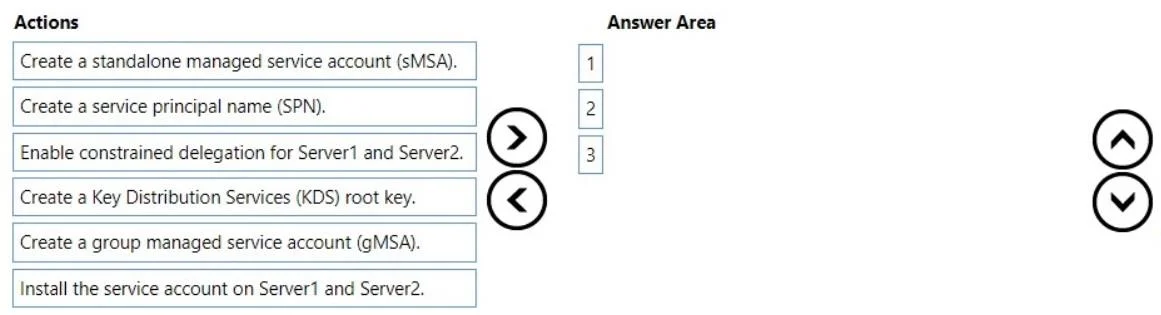
Drag and Drop Question Your network contains an Active Directory Domain Services (AD DS) domain. The domain contains two servers named Server1 and Server2 that run Windows Server 2022. You plan to…
The correct answer is Create a Key Distribution Services (KDS) root key.; Create a group managed service account (gMSA).; Install the service account on Server1 and Server2. To create a secure, automatically managed identity for a load-balanced application across multiple servers, the correct sequence involves setting up the Key Distribution Services root key, creating a Group Managed Service Account (gMSA), and then installing it on the target…
Question
Exhibit
Answer Area
Drag items
Correct arrangement
- Create a Key Distribution Services (KDS) root key.
- Create a group managed service account (gMSA).
- Install the service account on Server1 and Server2.
Explanation
To create a secure, automatically managed identity for a load-balanced application across multiple servers, the correct sequence involves setting up the Key Distribution Services root key, creating a Group Managed Service Account (gMSA), and then installing it on the target servers.
Approach. The scenario requires an identity for an application load-balanced between two servers (Server1 and Server2), with regular password changes and minimized administrative effort. This combination of requirements strongly points to the use of a Group Managed Service Account (gMSA). sMSAs are for single servers and would not efficiently meet the multi-server requirement with minimized administrative effort.
The steps to implement a gMSA are:
- Create a Key Distribution Services (KDS) root key: This is a prerequisite for creating gMSAs. The KDS root key is used by the Microsoft Key Distribution Service to create secret keys for gMSAs. If it doesn't exist in the domain (which is a common initial setup step for gMSAs), it must be created first. This ensures the necessary cryptographic infrastructure is in place for gMSA password management.
- Create a group managed service account (gMSA): Once the KDS root key is present, the gMSA object itself is created in Active Directory. This account is specifically designed for use by multiple servers, provides automatic password management (meeting the 'password must be changed regularly' and 'administrative effort must be minimized' requirements), and supports authentication for services running on those servers.
- Install the service account on Server1 and Server2: After the gMSA is created in Active Directory, it must be installed on the member servers (Server1 and Server2 in this case) that will run the application. This makes the gMSA available for services running on those specific machines. The application's service can then be configured to run under this gMSA, inheriting its managed password and multi-server capabilities.
Common mistakes.
- common_mistake. 1. Choosing 'Create a standalone managed service account (sMSA)': sMSAs are designed for services running on a single server. The scenario specifies an application load-balanced across two servers. While an sMSA provides automatic password management, it does not scale to multiple servers for a single identity, directly contradicting the 'minimized administrative effort' for a multi-server application. Each server would require its own sMSA, or the identity would not be shared.
- Choosing 'Create a service principal name (SPN)': An SPN is an identifier that uniquely identifies a service instance in a computer network. While a service account often needs an SPN registered for Kerberos authentication, creating an SPN is typically a configuration step after the service account itself (gMSA in this case) has been created and sometimes installed. It is not one of the fundamental three actions to create and deploy the managed identity itself. In many cases, gMSAs can automatically register their SPNs if configured correctly.
- Choosing 'Enable constrained delegation for Server1 and Server2': Delegation is an advanced security feature that allows a service running on one server to impersonate a user and connect to another service on a different server. While useful in some complex distributed application scenarios, it is not a direct step in creating or installing a service account and does not address the core requirements of automatic password management for a load-balanced application.
Concept tested. Active Directory Group Managed Service Accounts (gMSA) creation and deployment, including prerequisites (KDS root key) and benefits for multi-server, load-balanced applications requiring automated password management and reduced administrative overhead.
Topics
Community Discussion
No community discussion yet for this question.