
AZ-800 · Question #311
Drag and Drop Question You have an on-premises server that runs Windows Server and contains a file share named Share1. You have an Azure subscription that contains an Azure Files share named…
The correct answer is the server endpoint; the cloud endpoint; the sync group; Sync1. To correctly delete an Azure File Sync instance, you must remove the endpoints and then the sync group before deleting the top-level Azure File Sync service.
Question
Exhibit
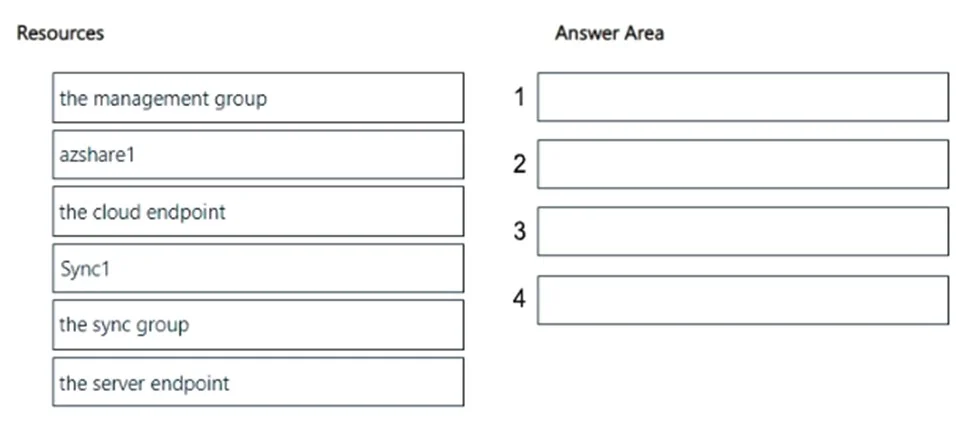
Answer Area
Drag items
Correct arrangement
- the server endpoint
- the cloud endpoint
- the sync group
- Sync1
Explanation
To correctly delete an Azure File Sync instance, you must remove the endpoints and then the sync group before deleting the top-level Azure File Sync service.
Approach. The correct interaction is to drag 'the server endpoint' to position 1, 'the cloud endpoint' to position 2, 'the sync group' to position 3, and 'Sync1' (the Azure File Sync service) to position 4. This sequence is correct because Azure File Sync resources have a hierarchical dependency. You must delete dependent child resources before deleting their parent resources.
- Delete the server endpoint: This is the most granular component within a sync group, representing the on-premises file share. It must be removed first to stop synchronization for that specific server path and before the sync group can be fully decommissioned.
- Delete the cloud endpoint: This represents the Azure Files share within the sync group. It must be removed after the server endpoint (or all server endpoints in a multi-server setup) and before the sync group itself can be deleted.
- Delete the sync group: Once all endpoints (server and cloud) have been removed from a sync group, the sync group itself can be safely deleted. A sync group cannot be deleted if it still contains active endpoints.
- Delete Sync1 (the Azure File Sync service): This is the top-level Azure File Sync resource. It can only be deleted once all associated sync groups within it have been deleted. Trying to delete the Azure File Sync service while it still contains sync groups will result in an error.
Common mistakes.
- common_mistake. Common mistakes include attempting to delete the top-level Azure File Sync service ('Sync1') or the sync group before removing their dependent endpoints. Azure enforces a hierarchy where child resources must be removed before their parents. For example, deleting 'Sync1' first would fail because it still contains sync groups and endpoints. Deleting 'the sync group' before its 'cloud endpoint' or 'server endpoint' would also fail. 'azshare1' (the Azure Files share) is a separate storage resource that can exist independently of Azure File Sync, and 'the management group' is a much higher-level organizational construct unrelated to deleting a specific Azure File Sync instance, so neither is part of this specific deletion process.
Concept tested. The underlying technical concept being tested is the understanding of the architectural hierarchy and dependencies within Azure File Sync, specifically the correct sequence of steps required to decommission or delete an Azure File Sync deployment. This includes knowing the relationship between the Azure File Sync service, sync groups, cloud endpoints, and server endpoints.
Reference. null
Community Discussion
No community discussion yet for this question.