
AZ-800 · Question #167
Case Study 3 - ADatum Corporation Overview Company Information ADatum Corporation is a manufacturing company that has a main office in Seattle and two branch offices in Los Angeles and Montreal…
The correct answer is File Server Resource Manager (FSRM). This question tests the correct sequence of ntdsutil.exe commands required to seize an FSMO (Flexible Single Master Operations) role, specifically the Schema Master, onto a new domain controller.
Question
Case Study 3 - ADatum Corporation Overview Company Information ADatum Corporation is a manufacturing company that has a main office in Seattle and two branch offices in Los Angeles and Montreal. Fabrikam Partnership ADatum recently partnered with 2 company named Fabrikam, Inc. Fabrikam is a manufacturing company that has a main office in Boston and a branch office in Orlando. Both companies intend to collaborate on several joint projects. Existing Environment ADatum AD DS Environment The on-premises network of ADatum contains an Active Directory Domain Services (AD DS) forest named adatum.com. The forest contains two domains named adatum.com and east.adatum.com and the domain controllers shown in the following table. Fabrikam AD DS Environment The on-premises network of Fabrikam contains an AD DS forest named fabrikam.com. The forest contains two domains named fabrikam.com and south.fabrikam.com. The fabrikam.com domain contains an organizational unit (OU) named Marketing. Server Infrastructure The adatum.com domain contains the servers shown in the following table. HyperV1 contains the virtual machines shown in the following table. All the virtual machines on HyperV1 have only the default management tools installed. SSPace1 contains the Storage Spaces virtual disks shown in the following table. Azure Resources ADatum has an Azure subscription that contains an Azure AD tenant. Azure AD Connect is configured to sync the adatum.com forest with Azure AD. The subscription contains the virtual networks shown in the following table. The subscription contains the Azure Private DNS zones shown in the following table. The subscription contains the virtual machines shown in the following table. All the servers are in a workgroup. The subscription contains a storage account named storage1 that has a file share named share1. Requirements Planned Changes ADatum plans to implement the following changes:
- Sync Data1 to share1.
- Configure an Azure runbook named Task1.
- Enable Azure AD users to sign in to Server1.
- Create an Azure DNS Private Resolver that has the following configurations:
- Name: Private1
- Region: West US
- Virtual network: VNet1
- Inbound endpoint: SubnetB
- Enable users in the adatum.com domain to access the resources in the south.fabrikam.com
domain. Technical Requirements ADatum identifies the following technical requirements:
- The data on SSPace1 must be available always.
- DC2 must become the schema master if DC1 fails.
- VM3 must be configured to enable per-folder quotas.
- Trusts must allow access to only the required resources.
- The users in the Marketing OU must have access to storage1.
- Azure Automanage must be used on all supported Azure virtual machines.
- A direct SSH session must be used to manage all the supported virtual machines on HyperV1.
Drag and Drop Question DC1 fails. You need to meet the technical requirements for the schema master. You run ntdsutil.exe. Which five commands should you run in sequence? To answer, move the appropriate commands from the list of commands to the answer area and arrange them in the correct order? Answer:
Exhibit
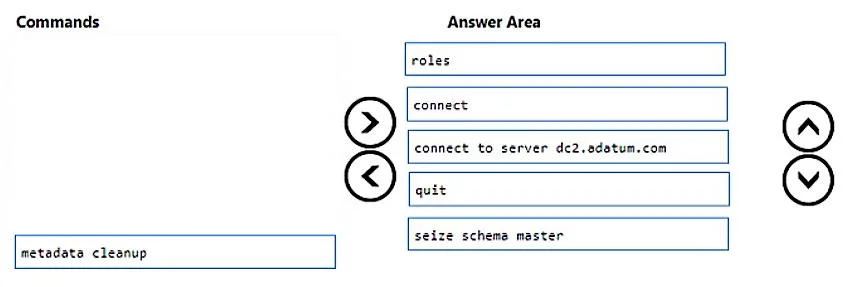
Answer Area
Drag items
Correct arrangement
- File Server Resource Manager (FSRM)
Explanation
This question tests the correct sequence of ntdsutil.exe commands required to seize an FSMO (Flexible Single Master Operations) role, specifically the Schema Master, onto a new domain controller.
Approach. The correct interaction involves dragging the commands into the 'Answer Area' in the following sequential order to successfully seize the Schema Master FSMO role using ntdsutil.exe:
roles: This is the initial command withinntdsutilto enter the FSMO maintenance context, changing the prompt tofsmo maintenance:.connect: From thefsmo maintenance:prompt, this command is used to enter theconnectionssubmenu, changing the prompt toconnections:.connect to server dc2.adatum.com: Within theconnections:submenu, this command establishes a connection to the specified domain controller (dc2.adatum.com). This is the server wherentdsutilis being run and where the FSMO role will be seized.quit: After successfully establishing the connection, this command is used to exit theconnectionssubmenu, returning to thefsmo maintenance:prompt.seize schema master: Now, at thefsmo maintenance:prompt, this command is executed to force the transfer (seizure) of the Schema Master FSMO role from a failed or unavailable domain controller to the currently connected server (dc2.adatum.com). This is a critical step in Active Directory disaster recovery.
Common mistakes.
- common_mistake. Common mistakes include:
- Including
metadata cleanup:metadata cleanupis a separatentdsutiloperation used to remove the metadata of a permanently decommissioned or failed domain controller from Active Directory. While often a subsequent step in a full DC removal and FSMO seizure scenario, it is not part of the direct sequence for seizing an FSMO role. - Incorrect order of
connectandconnect to server: Placingconnect to server dc2.adatum.combeforeconnectwould fail because theconnect to servercommand must be executed within theconnectionssubmenu, which is entered via theconnectcommand. - Misplacing
quit: Placingquitat an incorrect step would either prematurely exit a necessary context (e.g., exitingfsmo maintenancebefore seizing the role) or attempt to quit from a context not yet entered. - Skipping
roles: Not starting with therolescommand would preventntdsutilfrom entering the FSMO maintenance context, causing subsequent FSMO-related commands to fail.
Concept tested. The core technical concept tested is Active Directory FSMO (Flexible Single Master Operations) role management, specifically the procedure for seizing FSMO roles using the ntdsutil.exe command-line utility. This includes knowledge of the command syntax, the hierarchical structure of ntdsutil sub-contexts (e.g., fsmo maintenance, connections), and the correct sequence of operations required for disaster recovery of critical Active Directory roles.
Topics
Community Discussion
No community discussion yet for this question.