
AZ-800 · Question #170
Case Study 3 - ADatum Corporation Overview Company Information ADatum Corporation is a manufacturing company that has a main office in Seattle and two branch offices in Los Angeles and Montreal…
The correct answer is 1; 2; 3; 4; 5. This question tests the candidate's knowledge of the correct deployment sequence for Azure File Sync, requiring them to order the necessary steps to synchronize on-premises file shares with Azure Files.
Question
Case Study 3 - ADatum Corporation Overview Company Information ADatum Corporation is a manufacturing company that has a main office in Seattle and two branch offices in Los Angeles and Montreal. Fabrikam Partnership ADatum recently partnered with 2 company named Fabrikam, Inc. Fabrikam is a manufacturing company that has a main office in Boston and a branch office in Orlando. Both companies intend to collaborate on several joint projects. Existing Environment ADatum AD DS Environment The on-premises network of ADatum contains an Active Directory Domain Services (AD DS) forest named adatum.com. The forest contains two domains named adatum.com and east.adatum.com and the domain controllers shown in the following table. Fabrikam AD DS Environment The on-premises network of Fabrikam contains an AD DS forest named fabrikam.com. The forest contains two domains named fabrikam.com and south.fabrikam.com. The fabrikam.com domain contains an organizational unit (OU) named Marketing. Server Infrastructure The adatum.com domain contains the servers shown in the following table. HyperV1 contains the virtual machines shown in the following table. All the virtual machines on HyperV1 have only the default management tools installed. SSPace1 contains the Storage Spaces virtual disks shown in the following table. Azure Resources ADatum has an Azure subscription that contains an Azure AD tenant. Azure AD Connect is configured to sync the adatum.com forest with Azure AD. The subscription contains the virtual networks shown in the following table. The subscription contains the Azure Private DNS zones shown in the following table. The subscription contains the virtual machines shown in the following table. All the servers are in a workgroup. The subscription contains a storage account named storage1 that has a file share named share1. Requirements Planned Changes ADatum plans to implement the following changes:
- Sync Data1 to share1.
- Configure an Azure runbook named Task1.
- Enable Azure AD users to sign in to Server1.
- Create an Azure DNS Private Resolver that has the following configurations:
- Name: Private1
- Region: West US
- Virtual network: VNet1
- Inbound endpoint: SubnetB
- Enable users in the adatum.com domain to access the resources in the south.fabrikam.com
domain. Technical Requirements ADatum identifies the following technical requirements:
- The data on SSPace1 must be available always.
- DC2 must become the schema master if DC1 fails.
- VM3 must be configured to enable per-folder quotas.
- Trusts must allow access to only the required resources.
- The users in the Marketing OU must have access to storage1.
- Azure Automanage must be used on all supported Azure virtual machines.
- A direct SSH session must be used to manage all the supported virtual machines on HyperV1.
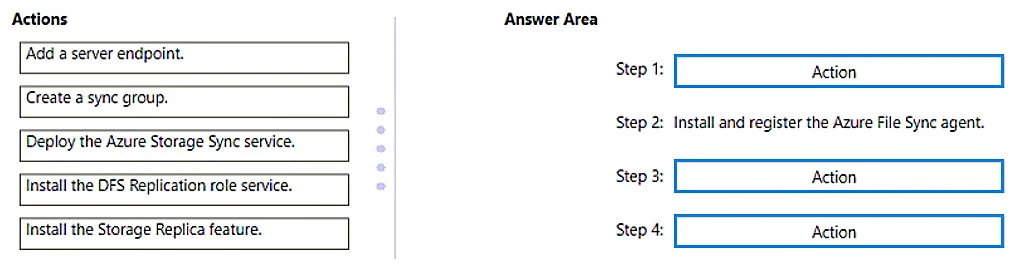
Drag and Drop Question You need to implement the planned change for Data1. Which actions should you perform in sequence? To answer, drag the appropriate actions to the correct order. Each action may be used once, more than once, or not at all. You may need to drag the split bar between panes or scroll to view content. NOTE: Each correct selection is worth one point. Answer:
Exhibit
Answer Area
Drag items
Correct arrangement
- 1
- 2
- 3
- 4
- 5
Explanation
This question tests the candidate's knowledge of the correct deployment sequence for Azure File Sync, requiring them to order the necessary steps to synchronize on-premises file shares with Azure Files.
Approach. The correct interaction is to drag and drop the actions into the Answer Area in the following order:
- Step 1: Deploy the Azure Storage Sync service. - This is the very first step in Azure. The Storage Sync Service is the top-level Azure resource that acts as a management layer for your sync topology. It must be created before any agents can be registered or sync groups defined.
- Step 2: Install and register the Azure File Sync agent. - This step is pre-filled. After the Azure Storage Sync service is deployed, the agent is installed on the on-premises Windows Server that hosts the file shares and then registered with the deployed Storage Sync Service.
- Step 3: Create a sync group. - Once the agent is registered and the Storage Sync Service is in place, a sync group defines the synchronization relationship. It specifies which Azure File Share (cloud endpoint) and which server endpoints (on-premises folders) will be synchronized. It must be created within the Storage Sync Service.
- Step 4: Add a server endpoint. - After a sync group is created, you add a server endpoint to it. A server endpoint represents a specific path on a registered server (where the agent is installed) that you want to synchronize with the Azure file share (cloud endpoint) within that sync group. This is the final step to establish the sync relationship for a specific folder.
Common mistakes.
- common_mistake. Common mistakes include misordering the steps or selecting irrelevant actions.
- Selecting 'Install the DFS Replication role service' or 'Install the Storage Replica feature': These are Windows Server features for on-premises replication (DFS-R) or disaster recovery (Storage Replica) respectively, and are not part of the core Azure File Sync deployment process. While Azure File Sync can coexist with DFS Namespaces, DFS Replication itself is not used for cloud synchronization.
- Incorrect order of steps: Forgetting to deploy the Azure Storage Sync service first, or trying to create a sync group or add a server endpoint before the agent is installed and registered, would lead to errors. The sequence of service deployment, agent installation/registration, sync group creation, and then server endpoint addition is critical for a successful Azure File Sync setup.
Concept tested. The underlying technical concept being tested is the correct deployment workflow and understanding of the components involved in setting up Azure File Sync, specifically the logical order of operations from creating Azure resources to configuring on-premises servers and defining synchronization relationships.
Reference. null
Topics
Community Discussion
No community discussion yet for this question.