
AZ-500 · Question #649
Hotspot Question You have an Azure subscription that contains a storage account named storage1. The storage1 account contains an Azure Blob Storage container named blob1 and an Azure Files share…
The correct answer is blob1:: Activity monitoring, Malware scanning, and Sensitive data discovery; share1:: Activity monitoring only. Microsoft Defender for Storage: Blob vs Files Feature Support --- Dropdown 1: blob1 (Azure Blob Storage) Correct: Activity monitoring, Malware scanning, and Sensitive data discovery Azure Blob Storage receives the full suite of Defender for Storage features: Activity monitoring…
Question
Exhibits
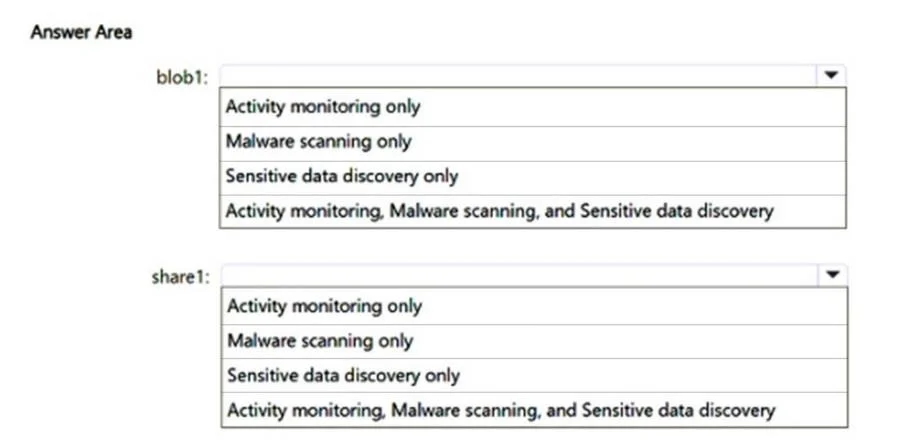
Answer Area
- blob1:Activity monitoring, Malware scanning, and Sensitive data discoveryActivity monitoring onlyMalware scanning onlySensitive data discovery onlyActivity monitoring, Malware scanning, and Sensitive data discovery
- share1:Activity monitoring onlyActivity monitoring onlyMalware scanning onlySensitive data discovery onlyActivity monitoring, Malware scanning, and Sensitive data discovery
Explanation
Microsoft Defender for Storage: Blob vs Files Feature Support
Dropdown 1: blob1 (Azure Blob Storage)
Correct: Activity monitoring, Malware scanning, and Sensitive data discovery
Azure Blob Storage receives the full suite of Defender for Storage features:
- Activity monitoring - Detects anomalous access patterns, unusual data exfiltration, access from Tor exit nodes, suspicious IPs, etc. Supported for Blob.
- Malware scanning - Uses Microsoft Defender Antivirus to scan uploaded blobs for malware at ingest time. This feature is blob-only and works by scanning content as files are uploaded.
- Sensitive data discovery - Uses Microsoft Purview's data classification engine to scan blob content for sensitive data types (PII, credentials, financial data, etc.). This is also blob-only because it requires content inspection.
Why alternatives are wrong:
- "Activity monitoring only" - understates blob's capabilities; malware scanning and sensitive data discovery are both available.
- "Malware scanning only" / "Sensitive data discovery only" - each omits the other two features that are also supported.
Dropdown 2: share1 (Azure Files)
Correct: Activity monitoring only
Azure Files has limited Defender for Storage support:
- Activity monitoring - Supported. Defender can monitor access patterns and flag anomalies on file share operations (e.g., unusual enumeration, access from suspicious IPs).
- Malware scanning - Not supported for Azure Files. The malware scanning engine only operates on Blob Storage uploads via event-driven triggers; there is no equivalent mechanism for SMB/NFS file share writes.
- Sensitive data discovery - Not supported for Azure Files. Content inspection and classification is only available for Blob Storage containers.
Why alternatives are wrong:
- "Malware scanning only" - malware scanning does not apply to Azure Files at all.
- "Sensitive data discovery only" - same; content scanning is blob-exclusive.
- "All three features" - incorrect; only activity monitoring extends to Azure Files.
Key Technical Concept
The distinction comes down to how each storage type is accessed:
| Feature | Blob Storage | Azure Files |
|---|---|---|
| Activity monitoring | Yes | Yes |
| Malware scanning | Yes | No |
| Sensitive data discovery | Yes | No |
Malware scanning and sensitive data discovery both require content-level inspection of objects. This is architecturally feasible for Blob Storage (object storage with REST API) but not implemented for Azure Files (which uses SMB/NFS protocols). Defender for Storage's content features were designed specifically around blob object lifecycle events.
Topics
Community Discussion
No community discussion yet for this question.