
AZ-500 · Question #587
Hotspot Question You have an on-premises server named Server1. You have an Azure subscription that contains a Microsoft Sentinel workspace named Sentinel1. You install the Windows Firewall solution…
This question tests knowledge of how to connect an on-premises Windows server to Microsoft Sentinel for firewall log monitoring, specifically what agent and Azure resource are required.
Question
Exhibit
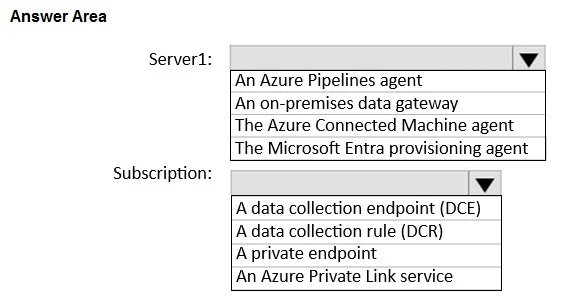
Answer Area
- Server1:An Azure Pipelines agentAn on-premises data gatewayThe Azure Connected Machine agentThe Microsoft Entra provisioning agent
- Subscription:A data collection endpoint (DCE)A data collection rule (DCR)A private endpointAn Azure Private Link service
Explanation
This question tests knowledge of how to connect an on-premises Windows server to Microsoft Sentinel for firewall log monitoring, specifically what agent and Azure resource are required.
Approach. On Server1, you must install the Azure Monitor Agent (AMA), which is the modern replacement for the legacy MMA/OMS agent and is required for the Windows Firewall solution in Microsoft Sentinel. In the Azure subscription, you must create a Data Collection Rule (DCR), which defines what data to collect (Windows Firewall logs/events) from the monitored server and where to send it (the Log Analytics workspace backing Sentinel1). The Windows Firewall solution specifically relies on AMA + DCR to ingest firewall log data from on-premises or Azure Windows machines into Microsoft Sentinel.
Concept tested. Microsoft Sentinel data collection architecture for on-premises Windows servers: the requirement for the Azure Monitor Agent (AMA) on the server and a Data Collection Rule (DCR) in Azure to route Windows Defender Firewall logs into a Sentinel-connected Log Analytics workspace.
Reference. https://learn.microsoft.com/en-us/azure/sentinel/data-connectors/windows-firewall
Topics
Community Discussion
No community discussion yet for this question.