
AZ-500 · Question #543
Hotspot Question You have an Azure subscription that contains a virtual machine named VM1. You have a network security group (NSG) named NSG1 that is associated to the network interface of VM1 and…
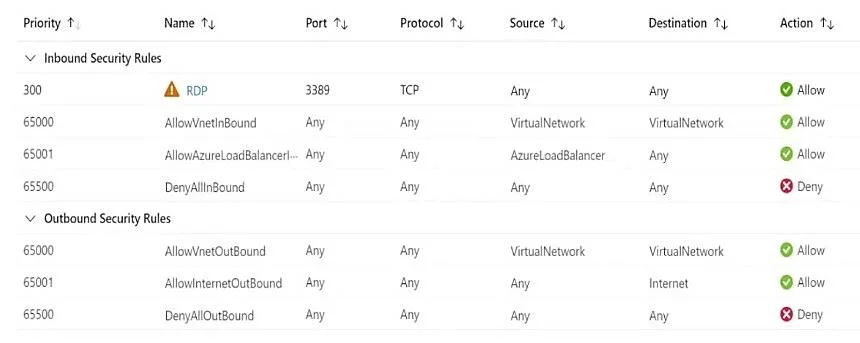
The correct answer is RDP = Yes; AllowVnetInBound = Yes; AllowAzureLoadBalancerl... = Yes; DenyAllInBound = No; AllowVnetOutBound = Yes; AllowInternetOutBound = Yes; DenyAllOutBound = No. This question tests understanding of how Just-in-Time (JIT) VM access interacts with existing NSG rules in Azure Security Center. JIT dynamically adds high-priority NSG rules to allow temporary access to management ports, overriding deny rules.
Question
Exhibits
Answer Area
- RDPYes
- AllowVnetInBoundYes
- AllowAzureLoadBalancerl...Yes
- DenyAllInBoundNo
- AllowVnetOutBoundYes
- AllowInternetOutBoundYes
- DenyAllOutBoundNo
Explanation
This question tests understanding of how Just-in-Time (JIT) VM access interacts with existing NSG rules in Azure Security Center. JIT dynamically adds high-priority NSG rules to allow temporary access to management ports, overriding deny rules.
Approach. When JIT VM access is activated, Azure Defender (Microsoft Defender for Cloud) automatically adds a high-priority ALLOW rule (typically priority 100) to NSG1 for the specified port (e.g., SSH port 22) from the requesting source IP. This JIT-created rule takes precedence over any existing deny rules because of its lower priority number. Once the JIT time window expires (up to 3 hours as configured), Azure automatically removes the temporary allow rule, and the original NSG deny rules are restored. So during the active JIT session: SSH (port 22) is accessible because JIT creates a high-priority allow rule; RDP (port 3389) is also temporarily allowed because it is listed as a JIT management port; after the time window expires, both ports revert to being blocked by the original NSG deny rules.
Concept tested. Just-in-Time (JIT) VM access in Microsoft Defender for Cloud and its interaction with Network Security Group (NSG) rules - specifically how JIT dynamically inserts temporary high-priority NSG allow rules for management ports (RDP/SSH), overrides existing deny rules during the active session window, and automatically removes those rules when the time window expires.
Reference. https://learn.microsoft.com/en-us/azure/defender-for-cloud/just-in-time-access-usage
Topics
Community Discussion
No community discussion yet for this question.