
AZ-500 · Question #466
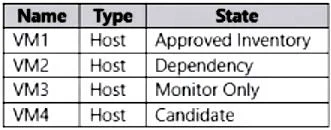
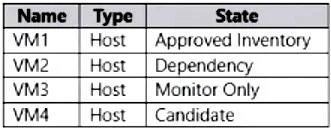
Hotspot Question You have an Azure subscription that contains a Microsoft Defender External Attack Surface Management (Defender EASM) resource named EASM1. EAMS1 contains the inventory assets shown…
The correct answer is VM1 will be scanned daily. = Yes; VM1 will display in the default dashboard charts. = Yes; VM2 will be scanned daily. = Yes; VM2 will display in the default dashboard charts. = No; VM3 will be scanned daily. = Yes; VM3 will display in the default dashboard charts. = No; VM4 will be scanned daily. = No; VM4 will display in the default dashboard charts. = No. This question tests knowledge of Microsoft Defender EASM asset states, specifically which asset states are included in daily scans and which appear in the default dashboard charts.
Question
Exhibits
Answer Area
- VM1 will be scanned daily.Yes
- VM1 will display in the default dashboard charts.Yes
- VM2 will be scanned daily.Yes
- VM2 will display in the default dashboard charts.No
- VM3 will be scanned daily.Yes
- VM3 will display in the default dashboard charts.No
- VM4 will be scanned daily.No
- VM4 will display in the default dashboard charts.No
Explanation
This question tests knowledge of Microsoft Defender EASM asset states, specifically which asset states are included in daily scans and which appear in the default dashboard charts.
Approach. In Defender EASM, only assets in 'Approved Inventory' state are scanned daily and appear in the default dashboard charts. Assets in states like 'Candidate', 'Dependency', 'Monitor Only', 'Requires Investigation', and 'Dismissed' are NOT included in daily scans nor shown in default dashboard charts. The 'Approved Inventory' state represents confirmed assets that belong to the organization, so EASM actively monitors them. Assets marked as 'Dependency' are third-party infrastructure your assets depend on but are not owned by you, so they appear in inventory but are not scanned daily or shown in default dashboards. Therefore, for the hotspot: assets with 'Approved Inventory' state answer YES to both 'scanned daily' and 'displayed in default dashboard charts', while assets in any other state (Candidate, Dependency, Monitor Only, Dismissed, Requires Investigation) answer NO to both questions.
Concept tested. Microsoft Defender EASM asset states and their behavior - specifically understanding that only 'Approved Inventory' assets are subject to daily scanning and inclusion in default dashboard charts, while other states like Candidate, Dependency, Monitor Only, and Dismissed are excluded from active monitoring and default reporting views.
Topics
Community Discussion
No community discussion yet for this question.