
AZ-500 · Question #650
Hotspot Question You have a Microsoft Entra tenant that is linked to two Azure subscriptions as shown in the following table. In Sub2, you plan to create a virtual machine named VM1. You need to…
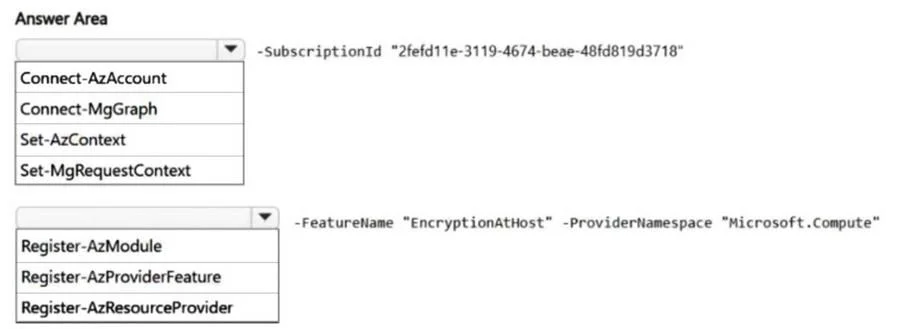
To enable encryption at host, you must first set the Azure PowerShell context to the correct subscription and then register the 'EncryptionAtHost' feature for the 'Microsoft.Compute' provider.
Question
Exhibits
Answer Area
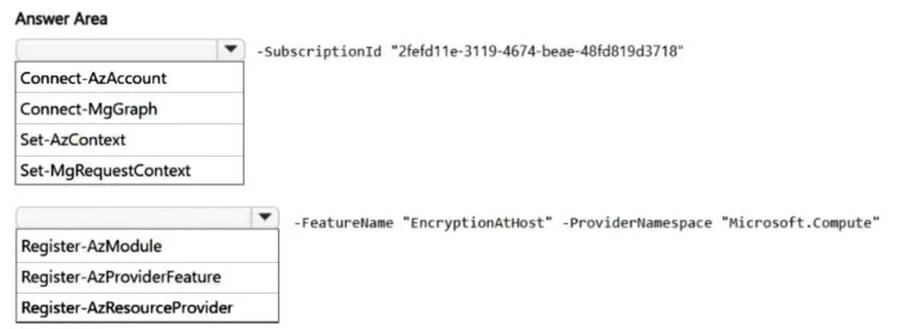
- -SubscriptionId "2fefd11e-3119-4674-beae-48fd819d3718"Connect-AzAccountConnect-MgGraphSet-AzContextSet-MgRequestContext
- -FeatureName "EncryptionAtHost" -ProviderNamespace "Microsoft.Compute"Register-AzModuleRegister-AzProviderFeatureRegister-AzResourceProvider
Explanation
To enable encryption at host, you must first set the Azure PowerShell context to the correct subscription and then register the 'EncryptionAtHost' feature for the 'Microsoft.Compute' provider.
Approach. The scenario requires preparing a subscription (Sub2, identified by the SubscriptionId) to enable 'EncryptionAtHost' for a future virtual machine. This involves two distinct steps, represented by the two dropdowns:
-
Setting the Azure Context: When working with multiple Azure subscriptions, it's crucial to ensure your Azure PowerShell session is targeting the correct subscription. The
Set-AzContextcmdlet is specifically designed for this purpose, allowing you to switch the active subscription context by providing its Subscription ID or name. The provided parameter-SubscriptionId "2fefd11e-3119-4674-beae-48fd819d3718"perfectly aligns withSet-AzContext. -
Registering the Feature: Many advanced or preview Azure features require explicit registration at the subscription level before they can be utilized. 'EncryptionAtHost' is one such feature. The
Register-AzProviderFeaturecmdlet is used to register a specific feature (identified by-FeatureName) within a given resource provider (identified by-ProviderNamespace) for the current subscription. The parameters-FeatureName "EncryptionAtHost" -ProviderNamespace "Microsoft.Compute"directly correspond to the use case forRegister-AzProviderFeature.
Common mistakes.
- common_mistake. Let's analyze the incorrect options:
Connect-AzAccount: This cmdlet is primarily used for the initial login to an Azure account. While it establishes a connection, it doesn't primarily serve to switch context between subscriptions if you're already logged in to an account with access to multiple subscriptions.Set-AzContextis the correct cmdlet for changing the active subscription.Connect-MgGraph/Set-MgRequestContext: These cmdlets are used for interacting with Microsoft Graph, not Azure Resource Manager, which is the service for managing Azure resources like virtual machines and their features. Therefore, they are irrelevant to this task.Register-AzModule: This is not a standard Azure PowerShell cmdlet for registering features. The typical cmdlet for installing modules isInstall-Module.Register-AzResourceProvider: This cmdlet registers an entire Azure resource provider (e.g.,Microsoft.Compute) for a subscription, allowing you to deploy resources from that provider. While 'Microsoft.Compute' is involved, the specific requirement is to enable a feature (EncryptionAtHost) within that provider, not to register the provider itself. The presence of the-FeatureNameparameter clearly indicates that a feature, not the entire provider, is being targeted, makingRegister-AzProviderFeaturethe precise choice.
Concept tested. Azure PowerShell for subscription management and feature registration. Specifically, it tests the ability to:
- Correctly set the active Azure subscription context.
- Understand and apply the cmdlet for registering specific features within an Azure resource provider.
- Knowledge of how to enable advanced features like 'Encryption at host' in Azure infrastructure services.
Topics
Community Discussion
No community discussion yet for this question.