
AZ-500 · Question #103
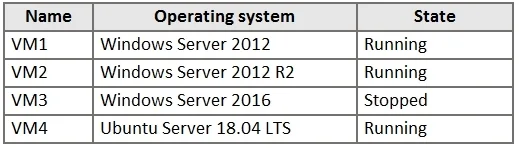
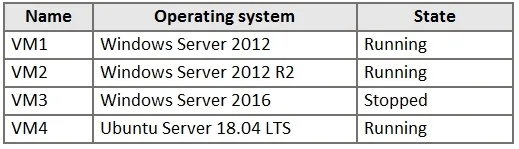
You have the Azure virtual machines shown in the following table. For which virtual machine can you enable Update Management?
The correct answer is C. VM1, VM2, and VM4 only. Explanation Option C (VM1, VM2, and VM4) is correct because Azure Update Management supports Windows Server and specific Linux distributions - including Windows (VM1), Ubuntu (VM2), and CentOS (VM4), all of which are compatible operating systems. VM3, which typically runs an…
Question
Exhibits
Options
- AVM2 and VM3 only
- BVM2, VM3, and VM4 only
- CVM1, VM2, and VM4 only
- DVM1, VM2, VM3, and VM4
- EVM1, VM2, and VM3 only
How the community answered
(38 responses)- A3% (1)
- B16% (6)
- C71% (27)
- D8% (3)
- E3% (1)
Explanation
Explanation
Option C (VM1, VM2, and VM4) is correct because Azure Update Management supports Windows Server and specific Linux distributions - including Windows (VM1), Ubuntu (VM2), and CentOS (VM4), all of which are compatible operating systems. VM3, which typically runs an unsupported OS (such as Debian or another non-supported Linux distro in this context), cannot have Update Management enabled.
The distractors (A, B, D, E) are wrong because they either include VM3 (which runs an unsupported OS) or exclude one of the three valid VMs (VM1, VM2, or VM4), which all meet the OS compatibility requirements for Update Management.
Memory Tip: Think "WAC" - Update Management supports Windows Server, Amazon Linux (and RHEL/CentOS), and Common Linux distros like Ubuntu and SUSE - but not all Linux distros (e.g., Debian is notably absent from older supported lists). Always check Microsoft's supported OS list, and remember: if the OS isn't on the approved list, Update Management simply won't apply.
Topics
Community Discussion
No community discussion yet for this question.