
AZ-500 · Question #648
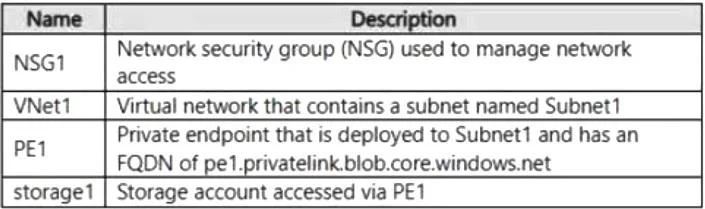
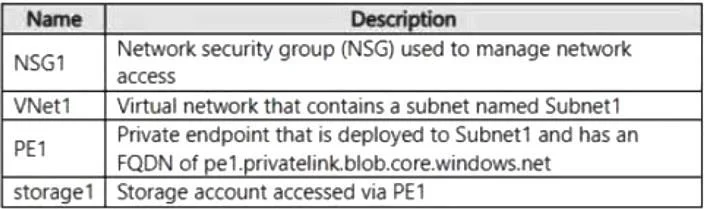
You have an Azure subscription that contains the resources shown in the following table. You need to integrate PE1 with NSG1 to manage network security for storage1. What should you do first?
The correct answer is A. Set Private endpoints network policy to Enabled. To integrate an Azure Private Endpoint with a Network Security Group (NSG) to manage security for a storage account, you must ensure that Network Policy for Private Endpoints is set to Enabled on the host subnet. By default, network policies (including NSGs and User-Defined…
Question
Exhibits
Options
- ASet Private endpoints network policy to Enabled.
- BImplement an Azure Private DNS zone.
- CCreate a dedicated subnet for PE1.
- DCreate a user-assigned managed identity.
How the community answered
(15 responses)- A73% (11)
- B7% (1)
- C7% (1)
- D13% (2)
Explanation
To integrate an Azure Private Endpoint with a Network Security Group (NSG) to manage security for a storage account, you must ensure that Network Policy for Private Endpoints is set to Enabled on the host subnet. By default, network policies (including NSGs and User-Defined Routes) are disabled for subnets containing Private Endpoints. When disabled, traffic to and from the Private Endpoint bypasses NSG security rules. Steps to Enable Integration 1. Access Subnet Settings: In the Azure Portal, navigate to the Virtual Network and select the *-> 2. Modify Network Policy: Select the specific subnet where the Private Endpoint is deployed. Under the Network Policy for Private Endpoints section, enable the setting for Network security 3. Apply Security Rules: Once enabled, the NSG associated with that subnet will begin evaluating traffic for the Private Endpoint’s private IP address based on your defined inbound and outbound 4. Verify Configuration: Ensure that the NSG contains rules that specifically allow or deny traffic to the Private Endpoint's IP address to confirm the integration is functioning as intended. https://learn.microsoft.com/en-us/azure/private-link/disable-private-endpoint-network-policy
Topics
Community Discussion
No community discussion yet for this question.