
AZ-500 · Question #566
Hotspot Question You have an Azure subscription named Sub1 and use Microsoft Defender for Cloud. Sub1 contains a user named User1 and a resource group named RG1. RG1 contains a Log Analytics…
The correct answer is Role:: Logic App Contributor; Resource:: RG1. This question tests knowledge of the minimum required RBAC role and correct resource scope needed to allow a user to modify Azure Logic Apps workflows used as playbooks in Microsoft Defender for Cloud security automation.
Question
Exhibit
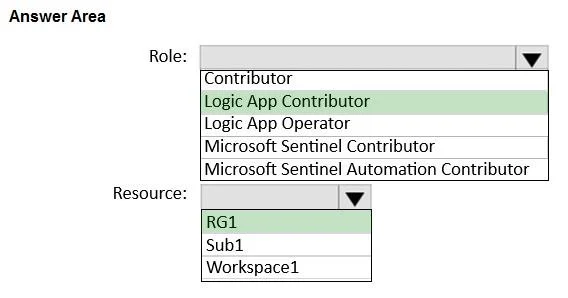
Answer Area
- Role:Logic App ContributorContributorLogic App ContributorLogic App OperatorMicrosoft Sentinel ContributorMicrosoft Sentinel Automation Contributor
- Resource:RG1RG1Sub1Workspace1
Explanation
This question tests knowledge of the minimum required RBAC role and correct resource scope needed to allow a user to modify Azure Logic Apps workflows used as playbooks in Microsoft Defender for Cloud security automation.
Approach. To modify Logic Apps workflows triggered in response to security incidents (playbooks), User1 needs the 'Logic App Contributor' role, which grants permissions to manage Logic Apps without granting access to the broader subscription or workspace. The role should be assigned at the resource group level (RG1), because Logic App playbooks reside within a resource group, and scoping to RG1 follows least privilege by not granting subscription-wide access. Assigning to Workspace1 or Sub1 would be either too narrow (workspace has no bearing on Logic Apps) or too broad (subscription-wide violates least privilege). The Logic App Contributor role specifically allows creating and modifying Logic Apps, which is exactly what is needed to edit automation workflows in Defender for Cloud.
Concept tested. Least-privilege RBAC role assignment for managing Microsoft Defender for Cloud automation playbooks (Azure Logic Apps), including choosing the correct role (Logic App Contributor) and the appropriate resource scope (resource group RG1) rather than subscription-level or workspace-level assignments.
Reference. https://learn.microsoft.com/en-us/azure/defender-for-cloud/workflow-automation#permissions-required
Topics
Community Discussion
No community discussion yet for this question.