
AZ-500 · Question #565
Hotspot Question You have an Azure subscription that is linked to a Microsoft Entra tenant named contoso.com. In contoso.com, you register an app named App1. You need to perform the following tasks…
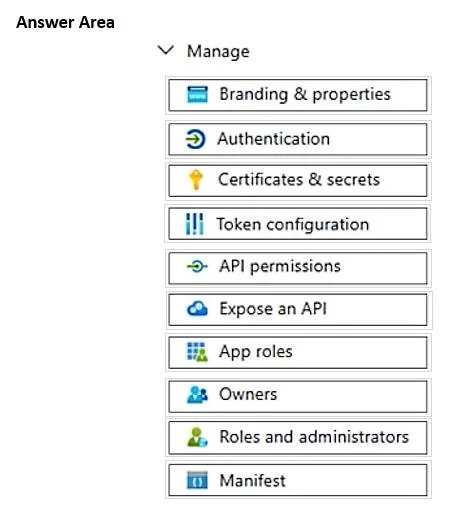
The correct answer is Branding & properties = No; Authentication = Yes; Certificates & secrets = No; Token configuration = Yes; API permissions = No; Expose an API = No; App roles = No; Owners = No; Roles and administrators = No; Manifest = No. This question tests knowledge of where to configure platform settings and optional claims for an app registration in Microsoft Entra ID (Azure AD). You must navigate to the correct blades within App1's registration to complete both tasks.
Question
Exhibit
Answer Area
- Branding & propertiesNo
- AuthenticationYes
- Certificates & secretsNo
- Token configurationYes
- API permissionsNo
- Expose an APINo
- App rolesNo
- OwnersNo
- Roles and administratorsNo
- ManifestNo
Explanation
This question tests knowledge of where to configure platform settings and optional claims for an app registration in Microsoft Entra ID (Azure AD). You must navigate to the correct blades within App1's registration to complete both tasks.
Approach. To add and configure the Mobile and desktop applications platform, you navigate to App1 in Microsoft Entra ID > App registrations > Authentication blade, then click 'Add a platform' and select 'Mobile and desktop applications'. To add the 'ipaddr' optional claim, you navigate to the 'Token configuration' blade within App1's registration, click 'Add optional claim', select the token type (ID, Access, or SAML), and then select 'ipaddr' from the list of available optional claims. These two blades - Authentication and Token configuration - are the correct settings to select.
Concept tested. Microsoft Entra ID App Registration configuration - specifically the Authentication blade for platform configuration (redirect URIs, mobile/desktop platform setup) and the Token configuration blade for adding optional claims such as 'ipaddr' (which provides the IP address of the client making the request).
Reference. https://learn.microsoft.com/en-us/azure/active-directory/develop/active-directory-optional-claims and https://learn.microsoft.com/en-us/azure/active-directory/develop/quickstart-register-app
Topics
Community Discussion
No community discussion yet for this question.