
AZ-500 · Question #357
Hotspot Question You have an Azure Active Directory (Azure AD) tenant that contains two users named User1 and User2 and a registered app named App1. You create an app-specific role named Role1. You…
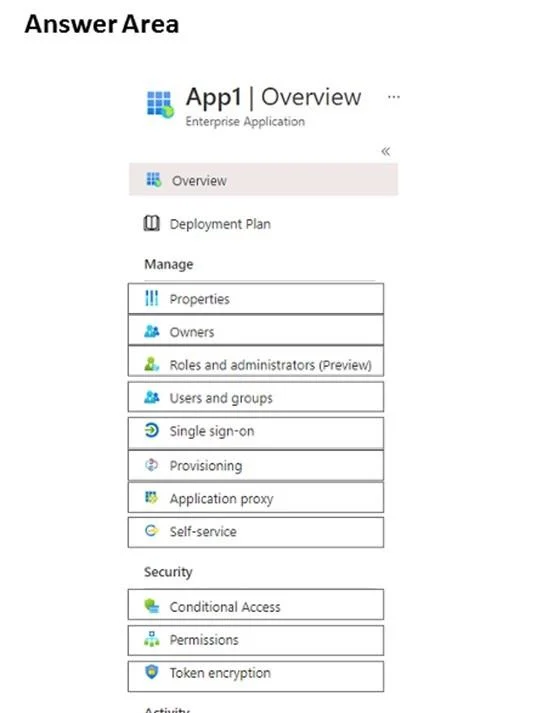
The correct answer is Properties = No; Owners = No; Roles and administrators (Preview) = No; Users and groups = Yes; Single sign-on = No; Provisioning = No; Application proxy = No; Self-service = Yes; Conditional Access = No; Permissions = No; Token encryption = No. This question tests knowledge of Azure AD Enterprise Applications settings for managing app role assignments and self-service access requests. You need to identify the correct configuration areas to assign Role1 to User1 and enable User2 to request access to App1.
Question
Exhibits
Answer Area
- PropertiesNo
- OwnersNo
- Roles and administrators (Preview)No
- Users and groupsYes
- Single sign-onNo
- ProvisioningNo
- Application proxyNo
- Self-serviceYes
- Conditional AccessNo
- PermissionsNo
- Token encryptionNo
Explanation
This question tests knowledge of Azure AD Enterprise Applications settings for managing app role assignments and self-service access requests. You need to identify the correct configuration areas to assign Role1 to User1 and enable User2 to request access to App1.
Approach. To assign Role1 to User1, you must navigate to the Enterprise Application blade for App1, then go to 'Users and groups' - this is where you assign users/groups to specific app roles defined in the application manifest. To enable User2 to request access to App1, you must configure the 'Self-service' settings under the Enterprise Application blade, which allows you to enable self-service application access and optionally define an approval workflow. These two settings - 'Users and groups' (for role assignment) and 'Self-service' (for enabling access requests) - are the two correct selections in the hotspot.
Concept tested. Azure AD Enterprise Applications configuration: assigning app roles to users via 'Users and groups' and enabling self-service application access via the 'Self-service' setting within an Enterprise Application's management blade.
Reference. https://learn.microsoft.com/en-us/azure/active-directory/manage-apps/assign-user-or-group-access-portal and https://learn.microsoft.com/en-us/azure/active-directory/manage-apps/manage-self-service-access
Topics
Community Discussion
No community discussion yet for this question.