
AZ-500 · Question #138
Hotspot Question You have an Azure subscription that contains the alerts shown in the following exhibit. Use the drop-down menus to select the answer choice that completes each statement based on…
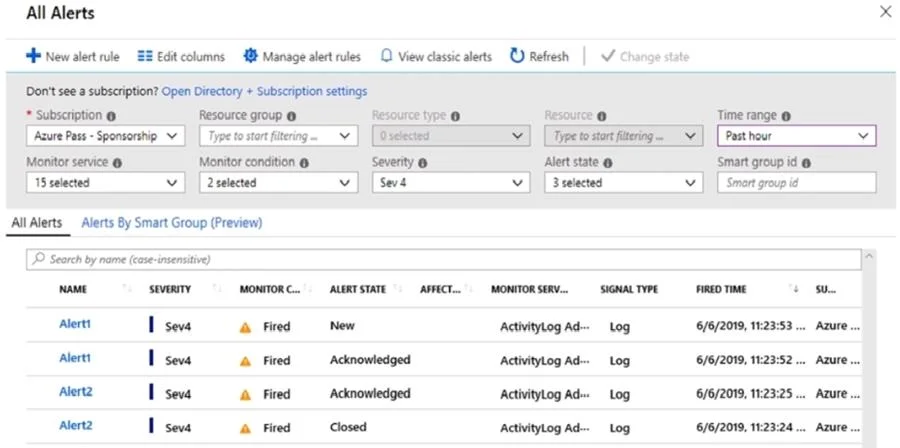
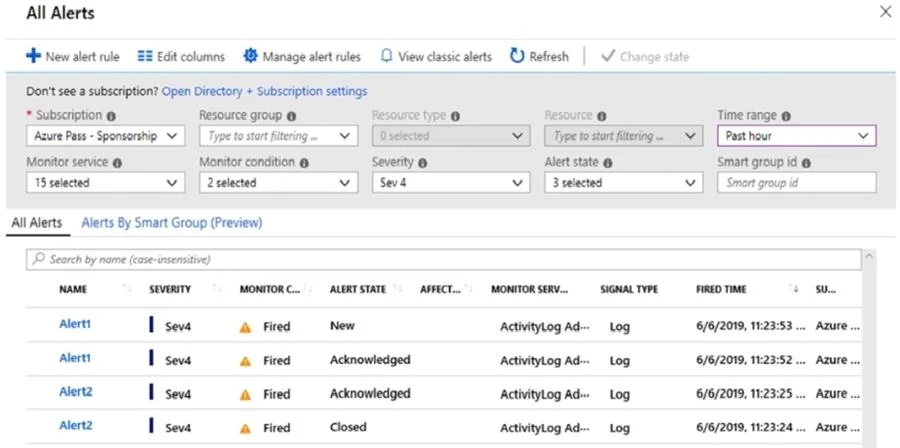
The correct answer is The state of Alert1 that was fired at 11:23:52: can be changed to Closed only; The state of Alert2 that was fired at 11:23:24: can be changed to New or Acknowledged. Based on the exhibit and the verified correct answers: 1. Alert1, which was fired at 11:23:52, is currently in an 'Acknowledged' state. From an 'Acknowledged' state, the only available state change is to 'Closed'. This indicates that once an alert is acknowledged, the next…
Question
Exhibits
Answer Area
- The state of Alert1 that was fired at 11:23:52can be changed to Closed onlycannot be changedcan be changed to Closed onlycan be changed to New onlycan be changed to New or Closed
- The state of Alert2 that was fired at 11:23:24can be changed to New or Acknowledgedcannot be changedcan be changed to Acknowledged onlycan be changed to New onlycan be changed to New or Acknowledged
Explanation
Based on the exhibit and the verified correct answers:
-
Alert1, which was fired at 11:23:52, is currently in an 'Acknowledged' state. From an 'Acknowledged' state, the only available state change is to 'Closed'. This indicates that once an alert is acknowledged, the next logical step in its lifecycle is to resolve and close it, rather than reverting it to a 'New' state.
-
Alert2, which was fired at 11:23:24, is currently in a 'Closed' state. From a 'Closed' state, the alert can be changed to either 'New' or 'Acknowledged'. This implies that a closed alert can be reopened, either by moving it back to a 'New' state to be re-evaluated, or directly to an 'Acknowledged' state if action is immediately being taken on it.
Topics
Community Discussion
No community discussion yet for this question.