
AZ-400 · Question #292
Hotspot Question You are finalizing a release in GitHub. You need to apply the following labels to the release: Name Email Release v3.0 Release date How should you complete the git command? To…
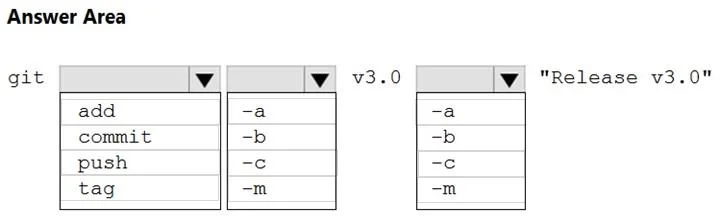
The correct answer is git subcommand: tag; tag option for annotation: -a; tag option for message: -m. This question tests knowledge of the git tag command and how to create an annotated tag in Git that includes metadata such as name, email, release version, and release date for a GitHub release.
Question
Exhibit
Answer Area
- git subcommandtagaddcommitpushtag
- tag option for annotation-a-a-b-c-m
- tag option for message-m-a-b-c-m
Explanation
This question tests knowledge of the git tag command and how to create an annotated tag in Git that includes metadata such as name, email, release version, and release date for a GitHub release.
Approach. To apply labels like Name, Email, Release v3.0, and Release date to a GitHub release, you use an annotated git tag with the command: git tag -a v3.0 -m 'Release v3.0' combined with configuring user.name and user.email. The full annotated tag command is git tag -a v3.0 -m 'Release v3.0' followed by git push origin v3.0. An annotated tag (created with -a) stores the tagger's name, email, date, and a tagging message - which correspond exactly to the required labels: Name (git config user.name), Email (git config user.email), Release v3.0 (the tag name), and Release date (the timestamp automatically recorded). The -a flag creates an annotated tag object, and -m supplies the message. Without -a, a lightweight tag is created which does NOT store name, email, or date metadata.
Concept tested. Creating annotated Git tags using git tag -a to capture release metadata including tagger name, email, tag name (release version), and release date - as opposed to lightweight tags which store none of this metadata.
Reference. https://git-scm.com/book/en/v2/Git-Basics-Tagging - Git documentation on annotated vs lightweight tags
Topics
Community Discussion
No community discussion yet for this question.