
AZ-400 · Question #425
Hotspot Question You use Git for source control. You need to optimize the performance of a repository. The solution must meet the following requirements: - Permanently remove all items referenced…
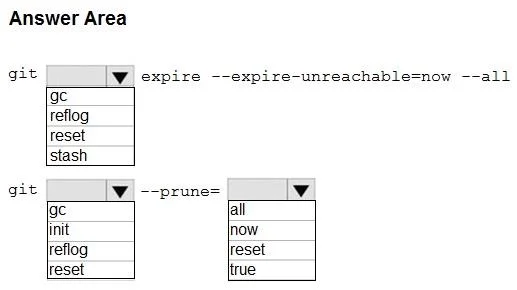
The correct answer is git [dropdown] expire --expire-unreachable=now --all: reflog; git [dropdown] --prune=: gc; --prune=[dropdown]: now. This question tests knowledge of Git garbage collection commands used to optimize repository performance by removing unreferenced objects and stale reflog entries.
Question
Exhibit
Answer Area
- git [dropdown] expire --expire-unreachable=now --allrefloggcreflogresetstash
- git [dropdown] --prune=gcgcinitreflogreset
- --prune=[dropdown]nowallnowresettrue
Explanation
This question tests knowledge of Git garbage collection commands used to optimize repository performance by removing unreferenced objects and stale reflog entries.
Approach. The correct command is: 'git gc --prune=now' combined with first expiring the reflog using 'git reflog expire --expire=now --all'. To permanently remove all items referenced only in the reflog, you use 'git reflog expire --expire=now --all' which expires all reflog entries immediately. Then 'git gc --prune=now' runs garbage collection and prunes all loose objects that are not reachable from any reference, including those just removed from the reflog. The '--prune=now' flag removes objects immediately rather than waiting for the default 2-week grace period, ensuring history not in any current branch is fully removed.
Concept tested. Git repository optimization using 'git reflog expire --expire=now --all' to clear reflog entries and 'git gc --prune=now' to perform immediate garbage collection and removal of unreachable objects. Understanding the difference between the default grace period pruning and immediate pruning with '--prune=now' is key.
Reference. https://git-scm.com/docs/git-gc | https://git-scm.com/docs/git-reflog
Topics
Community Discussion
No community discussion yet for this question.