
AZ-400 · Question #394
Drag and Drop Question You have an Azure Repos repository named repo1. You need to clone repo1. The solution must clone only a directory named src/web. How should you complete the script? To answer…
The correct answer is https://dev.azure.com/organization/project/_git/repo1; repo1/src/web; repo1; web. Git Sparse Checkout - Azure Repos This question tests your knowledge of Git sparse checkout, which lets you clone a repo but download only a specific subdirectory rather than the full working tree. The script being completed is roughly: ``bash git clone --filter=blob:none…
Question
Exhibits
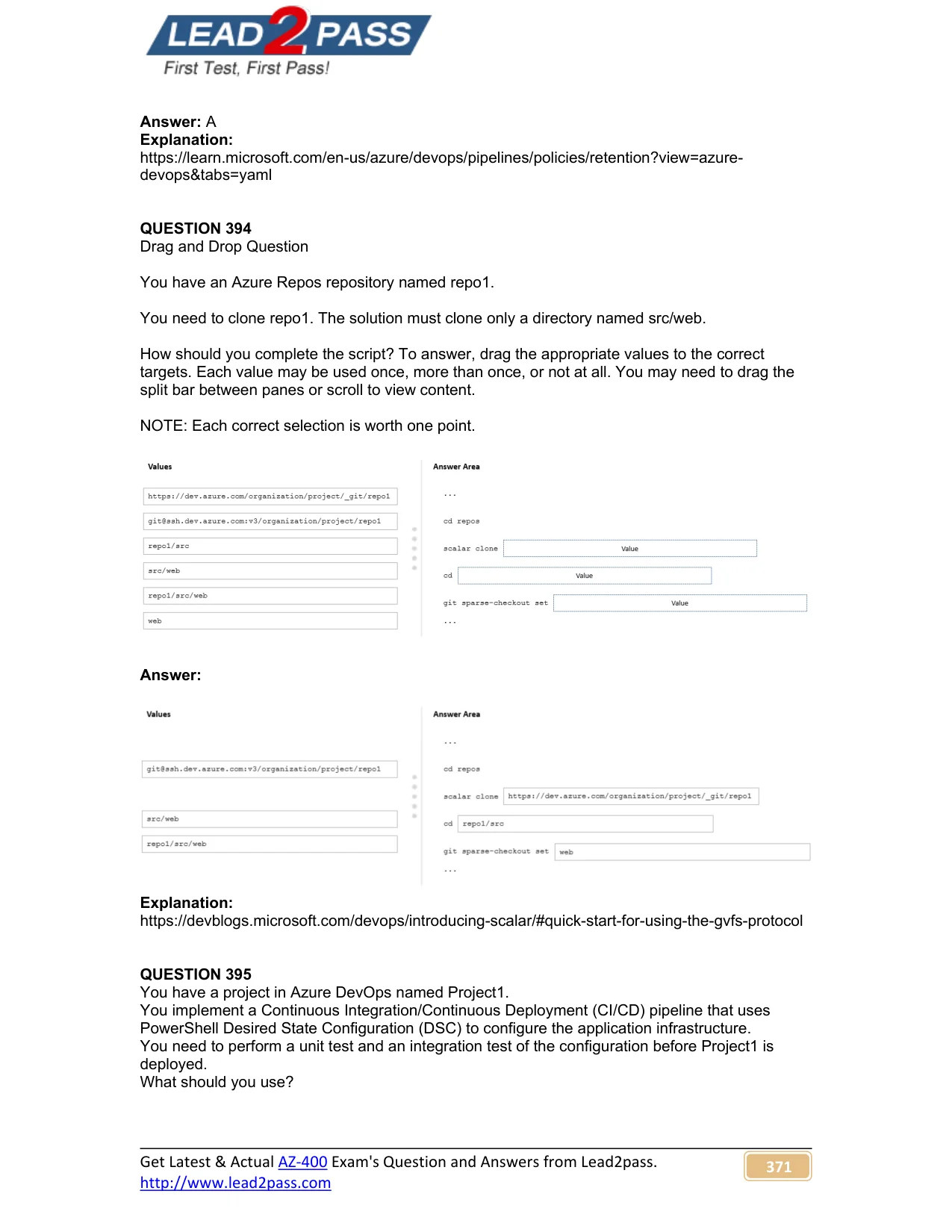
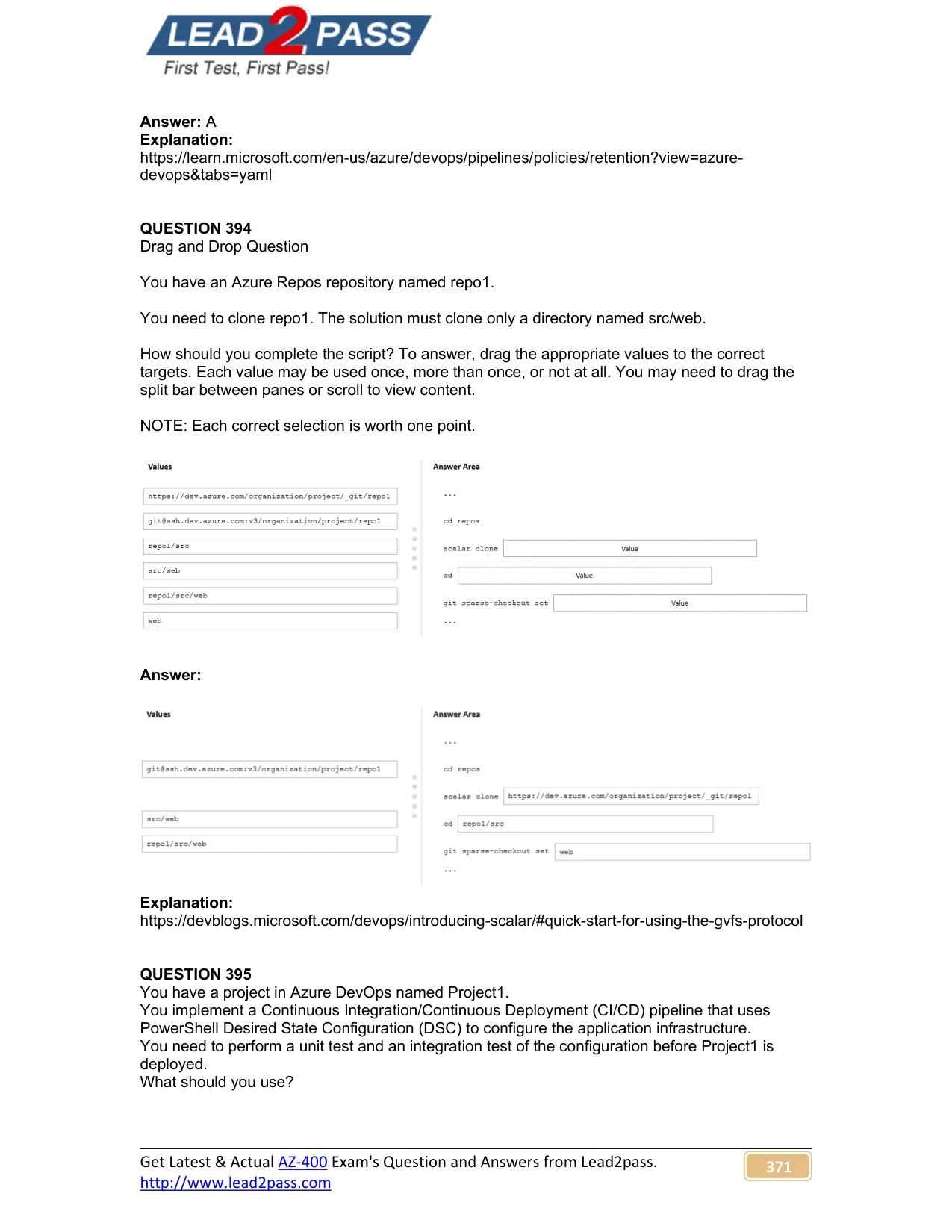
Answer Area
Drag items
Correct arrangement
- https://dev.azure.com/organization/project/_git/repo1
- repo1/src/web
- repo1
- web
Explanation
Git Sparse Checkout - Azure Repos
This question tests your knowledge of Git sparse checkout, which lets you clone a repo but download only a specific subdirectory rather than the full working tree.
The script being completed is roughly:
git clone --filter=blob:none --no-checkout [1]
cd [3]
git sparse-checkout set src/[4]
git checkout main
cd [2]
Position-by-Position Breakdown
Position 1 -> https://dev.azure.com/organization/project/_git/repo1
This is the repository URL passed to git clone. HTTPS is used here rather than the SSH alternative ([email protected]:v3/...). Both would work functionally, but HTTPS is the standard for scripted/automated contexts since it doesn't require SSH key setup. The SSH option is a distractor.
Position 2 -> repo1/src/web
After the sparse checkout completes, this is the full relative path used to cd into the checked-out directory from the parent working directory. Since git clone creates a folder named repo1, and sparse checkout populates only src/web within it, the full path from outside the repo is repo1/src/web.
Common mistake: using just src/web here - that path doesn't exist from outside the cloned directory.
Position 3 -> repo1
After cloning, Git creates a local directory named after the repository (repo1). The cd repo1 step enters the repo before running git sparse-checkout commands. This is the intermediate navigation step.
Common mistake: confusing this with repo1/src/web - you must cd into just the repo root first to run Git commands, not the sparse subdirectory.
Position 4 -> web
The sparse-checkout set command has src/ hardcoded, so only the subdirectory name fills this blank: git sparse-checkout set src/web. Using web here (not the full src/web) is because src/ is already part of the template.
Common mistake: putting src/web here, which would produce src/src/web - a path that doesn't exist.
Why Not SSH?
The SSH URL ([email protected]:v3/...) is a valid distractor. It's not wrong in general, but HTTPS is the expected answer for this type of automated/scripted clone scenario. Exams typically default to HTTPS unless SSH is explicitly required.
Why Not src/web as a standalone answer?
src/web is available but unused. It's a distractor that seems logical but fails in context: position 2 needs the full path from the parent directory (repo1/src/web), and position 4 only needs the leaf name (web) because the template already provides src/.
Topics
Community Discussion
No community discussion yet for this question.