
AZ-400 · Question #368
You use GitHub for source control and project-related discussions. You receive a notification when an entry is made to any team discussion. You need to ensure that you receive email notifications…
The correct answer is B. Automatically watch repositories C. Automatically watch teams. If "Automatically watch repositories" is disabled, then you will not automatically watch your own repositories. You must navigate to your repository page and choose the watch option. By default, anytime you gain access to a new repository, you will automatically begin watching…
Question
Exhibit
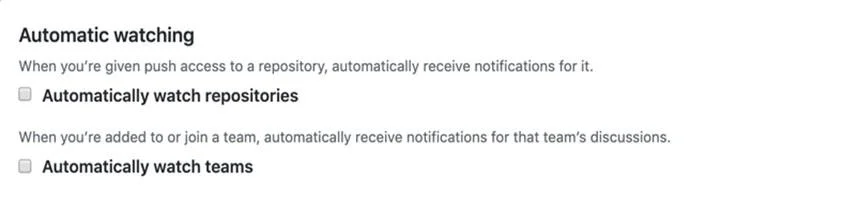
Options
- AParticipating
- BAutomatically watch repositories
- CAutomatically watch teams
- DWatching
How the community answered
(30 responses)- A3% (1)
- B93% (28)
- D3% (1)
Explanation
If "Automatically watch repositories" is disabled, then you will not automatically watch your own repositories. You must navigate to your repository page and choose the watch option. By default, anytime you gain access to a new repository, you will automatically begin watching that repository. Anytime you join a new team, you will automatically be subscribed to updates and receive notifications when that team is @mentioned. If you don't want to automatically be subscribed, you can unselect the automatic watching options. https://docs.github.com/en/account-and-profile/managing-subscriptions-and-notifications-on- github/setting-up-notifications/configuring-notifications
Community Discussion
No community discussion yet for this question.