
AZ-400 · Question #280
You have a private GitHub repository. You need to display the commit status of the repository on Azure Boards. What should you do first?
The correct answer is C. Add the Azure Boards app to the repository. To connect Azure Boards to GitHub.com, connect and configure from Azure Boards. Or, alternatively, install and configure the Azure Boards app from GitHub. Both methods have been streamlined and support authenticating and operating via the app rather than an individual. Note…
Question
Exhibit
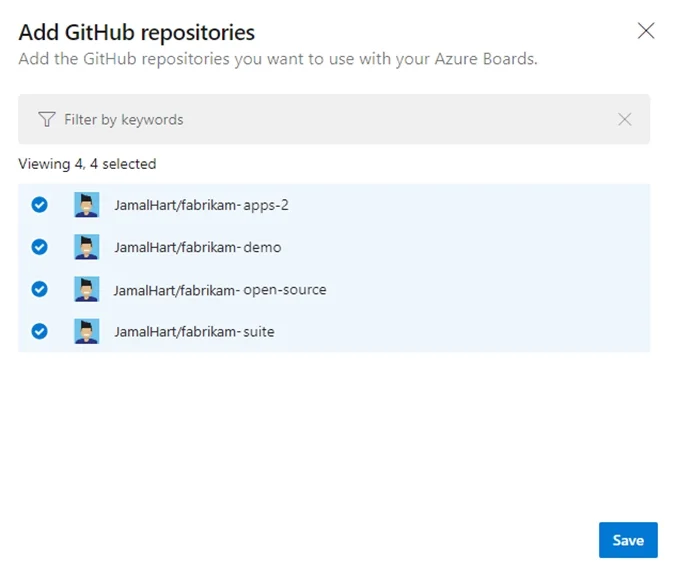
Options
- AConfigure multi-factor authentication (MFA) for your GitHub account.
- BAdd the Azure Pipelines app to the GitHub repository.
- CAdd the Azure Boards app to the repository.
- DCreate a GitHub action in GitHub.
How the community answered
(32 responses)- A9% (3)
- B16% (5)
- C72% (23)
- D3% (1)
Explanation
To connect Azure Boards to GitHub.com, connect and configure from Azure Boards. Or, alternatively, install and configure the Azure Boards app from GitHub. Both methods have been streamlined and support authenticating and operating via the app rather than an individual. Note (see step 4 below): Add a GitHub connection: 1. Sign into Azure Boards. 2. Choose (1) Project Settings, choose (2) GitHub connections and then (3) Connect your GitHub 3. If this is your first time connecting to GitHub from Azure Boards, you will be asked to sign in using your GitHub credentials. Choose an account for which you are an administrator for the repositories you want to connect to. 4. The Add GitHub Repositories dialog automatically displays and selects all GitHub.com repositories for which you are an administrator. Unselect any repositories that you don't want to participate in the integration. https://docs.microsoft.com/en-us/azure/devops/boards/github/connect-to-github
Topics
Community Discussion
No community discussion yet for this question.