nerdexam
Microsoft

AZ-120 · Question #64

Drag and Drop Question You have an SAP environment on Azure. You use Azure Recovery Services to back up an SAP application server. You need to test the restoration process of a file on the server. Whi

The correct answer is From Azure Recovery Vault, select File Recovery; Download and run the mount disk executable; Recover the file and unmount the disk. Azure File-Level Recovery from Recovery Services Vault The Correct Sequence Step 1: From Azure Recovery Vault, select File Recovery This is the entry point for the entire process. In the Azure portal, you navigate to the Recovery Services vault, locate the backup item (the SAP ap

Maintain SAP workloads on Azure

Question

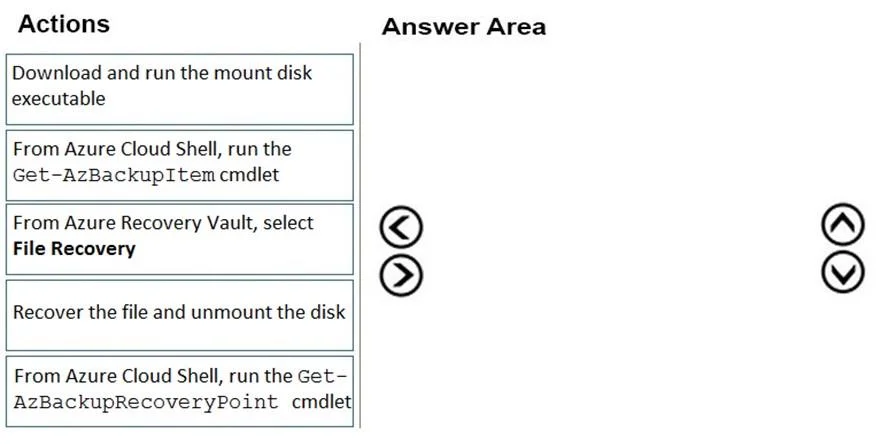
Drag and Drop Question You have an SAP environment on Azure. You use Azure Recovery Services to back up an SAP application server. You need to test the restoration process of a file on the server. Which three actions should you perform in sequence? To answer, move the appropriate actions from the list of actions to the answer area and arrange them in the correct order. Answer:

Exhibit
AZ-120 question #64 exhibit

Answer Area

Drag items

Download and run the mount disk executableFrom Azure Cloud Shell, run the Get-AzBackupItem cmdletFrom Azure Recovery Vault, select File RecoveryRecover the file and unmount the diskFrom Azure Cloud Shell, run the Get-AzBackupRecoveryPoint cmdlet

Correct arrangement

  • From Azure Recovery Vault, select File Recovery
  • Download and run the mount disk executable
  • Recover the file and unmount the disk

Explanation

Azure File-Level Recovery from Recovery Services Vault

The Correct Sequence

Step 1: From Azure Recovery Vault, select File Recovery

This is the entry point for the entire process. In the Azure portal, you navigate to the Recovery Services vault, locate the backup item (the SAP application server), and select File Recovery. This action prompts you to choose a recovery point and then generates a platform-specific script/executable. Nothing else can happen until this portal action produces that executable. You cannot mount a disk you don't yet have, so this must come first.

Step 2: Download and run the mount disk executable

The executable generated in Step 1 is downloaded and run on the target machine (or a machine that needs access to the files). It mounts the backup snapshot as a local iSCSI disk, making the backed-up file system browsable just like any other drive. This is the mechanism that gives you access to the files - you cannot copy or recover anything until the disk is mounted.

Step 3: Recover the file and unmount the disk

Once the disk is mounted, you browse it, copy the target file to its intended location, and then unmount (detach) the disk. Unmounting is a required cleanup step - it releases the iSCSI session and frees resources on the Azure side. Recovery and unmounting are grouped because they are the final, paired actions.


Why the Two PowerShell Options Are Distractors

DistractorWhy it's wrong here
Get-AzBackupItemUsed to list backup items via PowerShell scripting - not part of the portal-based File Recovery workflow
Get-AzBackupRecoveryPointUsed to enumerate recovery points via PowerShell - again, a scripting path, not the executable-based portal workflow

These cmdlets belong to a PowerShell-driven restore workflow, not the File Recovery portal workflow. The question specifies using Azure Recovery Vault's File Recovery feature, which uses the downloadable executable, making the PowerShell cmdlets irrelevant here.


Common Mistakes

  • Inserting a PowerShell step before mounting - Candidates assume they need to query recovery points via PowerShell first. The File Recovery portal UI handles recovery point selection internally; no separate cmdlet is needed.
  • Skipping the unmount step - Some overlook that unmounting is explicit and required, not automatic. Leaving the disk mounted can cause issues and incur continued resource usage.
  • Confusing this with a full VM restore - File Recovery is a targeted, lightweight operation distinct from full VM restoration; the executable-mount approach is unique to this path.

Topics

#Azure Recovery Services#file recovery#backup restoration#mount disk

Community Discussion

No community discussion yet for this question.

Full AZ-120 Practice