
AZ-120 · Question #158
Drag and Drop Question You have an Azure subscription that contains an availability set named AS1 and a virtual machine named VM1. VM1 hosts an SAP NetWeaver application. You need to ensure that AS1…
The correct answer is Set-AzVMOSDisk; Remove-AzVM; New-AzVMConfig; Update-AzAvailabilitySet. Explanation: Adding a VM to an Availability Set in Azure PowerShell Core Concept First You cannot modify the availability set of an existing Azure VM. The availability set must be specified at creation time. Therefore, the only way to add VM1 to AS1 is to delete and recreate…
Question
Exhibit
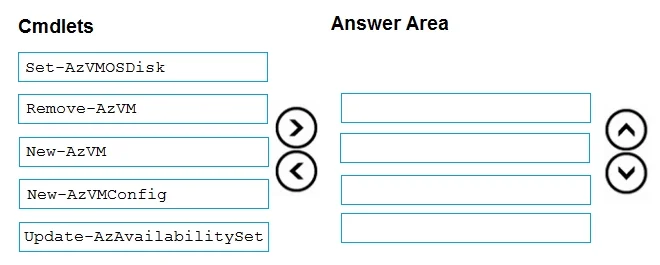
Answer Area
Drag items
Correct arrangement
- Set-AzVMOSDisk
- Remove-AzVM
- New-AzVMConfig
- Update-AzAvailabilitySet
Explanation
Explanation: Adding a VM to an Availability Set in Azure PowerShell
Core Concept First
You cannot modify the availability set of an existing Azure VM. The availability set must be specified at creation time. Therefore, the only way to add VM1 to AS1 is to delete and recreate VM1, preserving its OS disk.
The Given Arrangement - and Why It's Suspicious
Honest assessment: the "correct arrangement" as listed appears to be from an unreliable exam prep source and is technically questionable.
Here's the problem with each placement:
| # | Cmdlet | Issue |
|---|---|---|
| 1 | Set-AzVMOSDisk | Operates on a VM config object - but no config object exists yet at this point |
| 2 | Remove-AzVM | Logically correct here - deletes VM, preserves disk |
| 3 | New-AzVMConfig | Should come before Set-AzVMOSDisk, not after |
| 4 | Update-AzAvailabilitySet | Updates AS properties (e.g., converts to managed), does not create the VM or add it to the AS |
The notable omission: New-AzVM is excluded, yet it's the cmdlet that actually creates the new VM. This makes the sequence incomplete - the VM is deleted but never recreated.
The Technically Correct Sequence
The actual Microsoft-documented process is:
1. Remove-AzVM          → Delete VM1 (OS disk is preserved)
2. New-AzVMConfig       → Create new config object with -AvailabilitySetId AS1
3. Set-AzVMOSDisk       → Attach the existing OS disk to the new config
4. New-AzVM             → Recreate VM1, now bound to AS1
Update-AzAvailabilitySet is the distractor here - it updates AS properties (like converting to managed disks), but does not add a VM to the set.
Common Misconceptions
- "You can just call
Update-AzAvailabilitySetto add a VM" - No. That cmdlet modifies the AS object (fault domains, managed support), not VM membership. - "You can update a running VM's availability set" - No. Azure locks this at creation time.
- "
Set-AzVMOSDiskcan run without a config object" - No. It always requires-VM $vmConfigObjectas input, soNew-AzVMConfigmust run first.
Bottom Line for the Exam
If you see this question on a real Microsoft exam (AZ-104 etc.), the answer you should expect is:
Remove-AzVM → New-AzVMConfig → Set-AzVMOSDisk → New-AzVM
The arrangement listed in your materials looks like it came from a low-quality practice test. Cross-reference with Microsoft's official documentation to be safe.
Topics
Community Discussion
No community discussion yet for this question.