
AZ-120 · Question #252
Drag and Drop Question You have a single-instance SAP NetWeaver deployment hosted on Azure virtual machines that run Windows Server 2022. You plan to implement Azure Monitor for SAP Solutions to…
The correct answer is From the SAP GUI, execute transaction RZ10.; From the SAP GUI, modify the DEFAULT.PFL profile.; From SAP Management Console, restart the SAPStartSRV service. Explanation: Configuring SAPControl Web Service Access for Azure Monitor for SAP Solutions Background Azure Monitor for SAP Solutions collects metrics from the SAP application tier by calling SAPControl web service methods (e.g., GetProcessList, GetSystemInstanceList…
Question
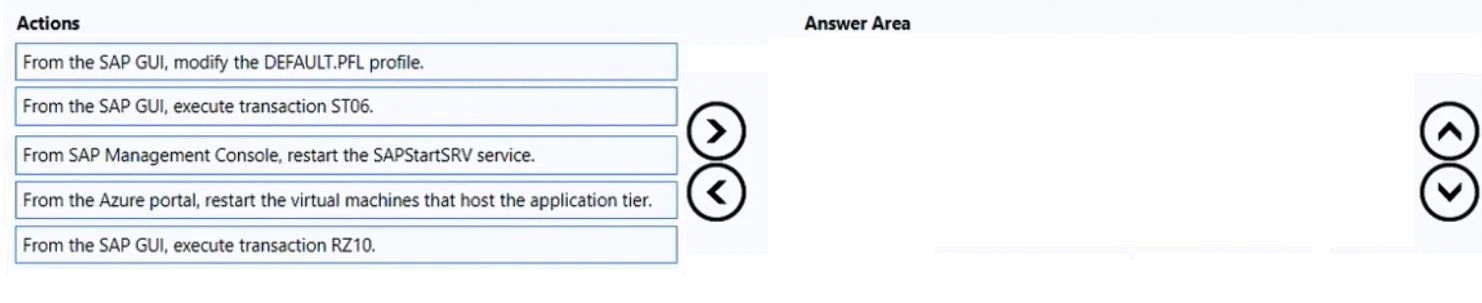
Drag and Drop Question You have a single-instance SAP NetWeaver deployment hosted on Azure virtual machines that run Windows Server 2022. You plan to implement Azure Monitor for SAP Solutions to monitor the application tier. You need to ensure that Azure Monitor for SAP Solutions can access the SAPControl web service methods on the application tier. The solution must minimize application downtime. Which three actions should you perform in sequence? To answer, move the appropriate actions from the list of actions to the answer area and arrange them in the correct order. Answer:
Exhibit
Answer Area
Drag items
Correct arrangement
- From the SAP GUI, execute transaction RZ10.
- From the SAP GUI, modify the DEFAULT.PFL profile.
- From SAP Management Console, restart the SAPStartSRV service.
Explanation
Explanation: Configuring SAPControl Web Service Access for Azure Monitor for SAP Solutions
Background
Azure Monitor for SAP Solutions collects metrics from the SAP application tier by calling SAPControl web service methods (e.g., GetProcessList, GetSystemInstanceList, GetAlertTree). By default, many of these methods are protected - they require authentication or are blocked entirely. To allow Azure Monitor to call them, you must modify the SAP system profile and then restart the service that exposes them.
Step-by-Step Breakdown
Step 1 - Execute transaction RZ10
Why first: RZ10 is SAP's built-in profile editor. You must launch it before you can view or edit any profile. It's the entry point - there is no other supported way to make persistent, traceable changes to SAP system profiles. Without RZ10 open, you cannot proceed to modify DEFAULT.PFL.
Step 2 - Modify the DEFAULT.PFL profile
Why second: Once inside RZ10, you edit the DEFAULT.PFL (the global default profile, applied system-wide). The critical parameter is:
service/protectedwebmethods = ""
Setting this to empty removes protection from SAPControl web methods, allowing Azure Monitor to query them without being blocked. DEFAULT.PFL is the correct profile to change because it applies across all instances. The change is saved to disk here but does not take effect until the service that reads it is restarted - hence step 3.
Step 3 - Restart the SAPStartSRV service from SAP Management Console
Why third: The SAPStartSRV service (part of the SAP Host Agent / SAP Start Service) is what exposes the SAPControl web service. It reads the profile at startup. Restarting only this service - not the entire SAP instance or the VM - is sufficient to load the updated profile and takes only seconds, minimizing downtime.
SAP Management Console (MMC snap-in on Windows) provides a targeted restart of SAPStartSRV without affecting the ABAP application server itself.
Why the Remaining Items Are Wrong
| Item | Why Excluded |
|---|---|
| ST06 | OS Monitor transaction - displays operating system performance metrics. Completely unrelated to SAPControl configuration. |
| Restart the virtual machines | Would eventually apply the profile change, but restarting a full Windows VM causes far more downtime than restarting one Windows service. Violates the "minimize downtime" constraint. |
Common Mistakes & Misconceptions
-
Skipping RZ10 and editing the file directly: Some candidates assume you can edit the
.PFLfile in the filesystem. While technically possible, it's unsupported and bypasses SAP's change tracking. The exam always expects the supported SAP path (RZ10). -
Restarting the wrong thing: A common error is choosing VM restart over SAPStartSRV restart. Both apply the change, but only SAPStartSRV restart satisfies the "minimize downtime" requirement. SAPStartSRV is independent of the ABAP work processes.
-
Confusing DEFAULT.PFL with instance profiles: Instance profiles (e.g.,
SAP_D00) apply only to a specific application server instance. DEFAULT.PFL applies globally and is the correct target for this type of system-wide web service configuration. -
Reversing steps 1 and 2: RZ10 is the tool; DEFAULT.PFL is the object. You can't modify the profile before opening the editor - step 1 must come first.
Topics
Community Discussion
No community discussion yet for this question.