
AZ-120 · Question #264
Drag and Drop Question You have an Azure subscription that contains a highly available SAP NetWeaver deployment. The deployment contains four virtual machines. You need to monitor the NetWeaver…
The correct answer is On each virtual machine, install node_exporter.; From the SAP GUI, connect to the SAP system and modify the instance profiles.; From the Azure portal, deploy the Azure Monitor for SAP Solutions managed resource group and configure the NetWeaver provider. Azure Monitor for SAP Solutions - NetWeaver Provider Setup Why This Sequence The guiding constraint is minimizing downtime. The correct order front-loads all non-SAP work (zero downtime), then performs the one necessary SAP configuration change, and finally deploys the…
Question
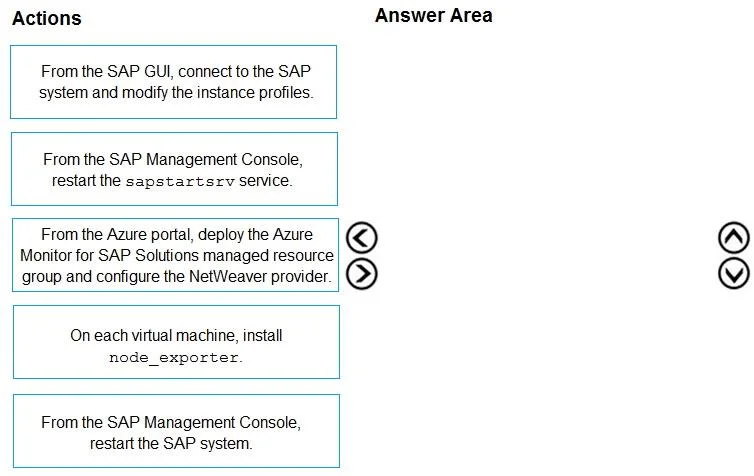
Drag and Drop Question You have an Azure subscription that contains a highly available SAP NetWeaver deployment. The deployment contains four virtual machines. You need to monitor the NetWeaver deployment by using Azure Monitor for SAP Solutions. During the implementation of Azure Monitor for SAP Solutions, downtime of the deployment must be minimized. Which three actions should you perform in sequence? To answer, move the appropriate actions from the list of actions to the answer area and arrange them in the correct order. Answer:
Exhibit
Answer Area
Drag items
Correct arrangement
- On each virtual machine, install node_exporter.
- From the SAP GUI, connect to the SAP system and modify the instance profiles.
- From the Azure portal, deploy the Azure Monitor for SAP Solutions managed resource group and configure the NetWeaver provider.
Explanation
Azure Monitor for SAP Solutions - NetWeaver Provider Setup
Why This Sequence
The guiding constraint is minimizing downtime. The correct order front-loads all non-SAP work (zero downtime), then performs the one necessary SAP configuration change, and finally deploys the Azure-side monitoring resource. This avoids multiple SAP restarts.
Step-by-Step Reasoning
Step 1 - Install node_exporter on each virtual machine
node_exporter is a Prometheus-compatible exporter that exposes OS-level metrics (CPU, memory, disk, network) from the Linux VMs. The Azure Monitor for SAP Solutions NetWeaver provider depends on node_exporter to collect host-level telemetry.
Installing it is an OS-level operation that runs as a background service - zero SAP downtime. Doing it first means the metrics endpoint is ready before AMS ever tries to connect. If you deploy AMS first, its health checks immediately fail because nothing is listening.
Step 2 - From the SAP GUI, connect to the SAP system and modify the instance profiles
The NetWeaver provider communicates with SAP via the sapstartsrv SOAP/HTTP web service interface. To enable this, specific instance profile parameters must be set (e.g., service/protectedwebmethods, ICM settings). Profile changes require a restart of either the instance or the sapstartsrv service to take effect.
This is the only step that risks downtime, so it's done in isolation. With four VMs in a highly available deployment, changes can be rolled across VMs one at a time to keep the system available overall. Doing this before AMS deployment means one controlled restart window - not multiple.
Step 3 - From the Azure portal, deploy the Azure Monitor for SAP Solutions managed resource group and configure the NetWeaver provider
Once both prerequisites are satisfied (node_exporter running, SAP profiles configured), you deploy the AMS managed resource group and point the NetWeaver provider at your SAP system. This is pure Azure portal work - zero SAP downtime. The provider can immediately connect successfully because the groundwork is already in place.
Why the Distractors Are Wrong
| Distractor | Why It's Wrong |
|---|---|
RZ10 transaction | RZ10 is the tool within SAP to edit profiles - it's a sub-step of "modify instance profiles," not a standalone sequence item. Using it alone misses the connection step and is too granular. |
ST06 transaction | OS Monitor - used to view OS metrics, not to configure monitoring. Irrelevant here. |
Modify DEFAULT.PFL | The DEFAULT profile sets global baseline parameters. NetWeaver provider configuration goes in instance profiles, not the default profile. |
| Restart the SAP system (full) | A full system restart causes maximum downtime. You only need to restart sapstartsrv (the host agent service) after profile changes - not the entire SAP system. |
| Restart VMs from Azure portal | Rebooting entire VMs is unnecessary and causes far more downtime than a sapstartsrv service restart. |
| Deploy AMS first | AMS would immediately fail its connectivity checks if node_exporter isn't installed and SAP profiles aren't configured. Always prepare the target first. |
Key Misconception to Avoid
Many candidates assume the Azure deployment step should come first because it "sets up" monitoring. In reality, AMS is the consumer - the VMs and SAP system are the sources. Always configure the sources before deploying the consumer, or you'll get immediate configuration errors and face additional restart cycles to fix them, increasing total downtime.
Topics
Community Discussion
No community discussion yet for this question.