
AZ-120 · Question #263
Drag and Drop Question You have a single-instance SAP NetWeaver deployment hosted on Azure virtual machines that run Windows Server 2022. You plan to implement Azure Monitor for SAP Solutions to…
The correct answer is From the SAP GUI, execute transaction RZ10.; From the SAP GUI, modify the DEFAULT.PFL profile.; From SAP Management Console, restart the SAPStartSRV service. Explanation: Configuring SAPControl Access for Azure Monitor for SAP Solutions Background Azure Monitor for SAP Solutions collects metrics from the SAP application tier by calling SAPControl SOAP web service methods (e.g., GetProcessList, GetSystemInstanceList). By default, SAP…
Question
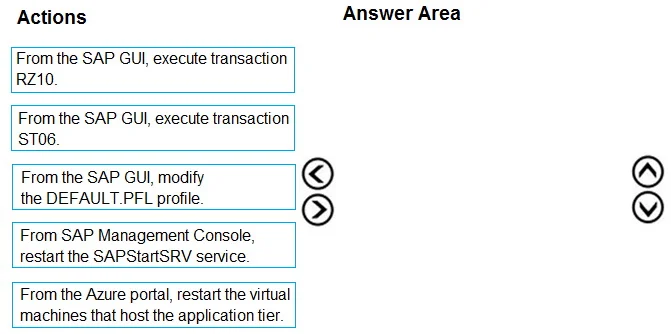
Drag and Drop Question You have a single-instance SAP NetWeaver deployment hosted on Azure virtual machines that run Windows Server 2022. You plan to implement Azure Monitor for SAP Solutions to monitor the application tier. You need to ensure that Azure Monitor for SAP Solutions can access the SAPControl web service methods on the application tier. The solution must minimize application downtime. Which three actions should you perform in sequence? To answer, move the appropriate actions from the list of actions to the answer area and arrange them in the correct order. Answer:
Exhibit
Answer Area
Drag items
Correct arrangement
- From the SAP GUI, execute transaction RZ10.
- From the SAP GUI, modify the DEFAULT.PFL profile.
- From SAP Management Console, restart the SAPStartSRV service.
Explanation
Explanation: Configuring SAPControl Access for Azure Monitor for SAP Solutions
Background
Azure Monitor for SAP Solutions collects metrics from the SAP application tier by calling SAPControl SOAP web service methods (e.g., GetProcessList, GetSystemInstanceList). By default, SAP restricts remote access to these methods via the profile parameter service/protectedwebmethods. The goal is to whitelist the required methods without bouncing the entire SAP system or the VM.
Step-by-Step Breakdown
Step 1 - Execute transaction RZ10
RZ10 is the SAP Profile Maintenance transaction. It is the correct, supported tool for reading and editing SAP profiles (instance profiles, default profile) from within the SAP GUI. You must open RZ10 first because the change you need to make (whitelisting SAPControl web methods) lives in the profile layer, and RZ10 is the gateway to that layer. Editing profile files directly on disk is possible but error-prone and not the recommended approach.
Step 2 - Modify the DEFAULT.PFL profile
Inside RZ10, you edit the DEFAULT profile (DEFAULT.PFL) and change the parameter:
service/protectedwebmethods = "" (or the specific methods Azure Monitor needs)
By default this parameter is set to restrict remote callers from invoking SAPControl methods. Clearing or adjusting it allows Azure Monitor's SAP Solutions provider to reach the web service endpoints it needs. The DEFAULT profile is used here because its settings apply system-wide across all application server instances, making this the right scope for a monitoring configuration change.
Step 3 - Restart SAPStartSRV from SAP Management Console
SAPStartSRV (the SAP Start Service) is the Windows service that hosts the SAPControl web interface. Profile parameter changes are not applied live - the service must be restarted to read the updated profile. Critically, SAPStartSRV runs independently of the SAP work processes (dialog, background, etc.), so restarting it does not stop the SAP application itself, satisfying the "minimize downtime" constraint. SAP Management Console (MMC snap-in on Windows) gives you a targeted way to restart just this service.
Why the Other Items Are Wrong
| Item | Why Excluded |
|---|---|
| ST06 | This is the OS Monitor transaction (CPU, memory, disk). It has no role in configuring web service access permissions. It is a distractor. |
| Restart the Azure VMs | This causes full application downtime and is unnecessary. Restarting only SAPStartSRV is sufficient to apply the profile change. This directly violates the "minimize downtime" requirement. |
Common Mistakes and Misconceptions
-
Confusing ST06 with a relevant monitoring step. ST06 sounds plausible because it's an OS monitoring tool, but configuring what can monitor SAP is a profile/service task, not an OS metric task.
-
Choosing VM restart over SAPStartSRV restart. Candidates often assume profile changes require a full reboot. They don't - only the service that reads those parameters needs to restart, and
SAPStartSRVis that service. -
Reversing Steps 1 and 2. RZ10 must come before modifying the profile because RZ10 is the tool you use to perform the modification. They are not two independent steps - Step 1 opens the environment for Step 2.
-
Editing the profile without going through RZ10. Directly editing
.PFLfiles bypasses SAP's internal consistency checks and is not the exam-expected or production-recommended method.
Topics
Community Discussion
No community discussion yet for this question.