
AZ-120 · Question #251
Drag and Drop Question You have an Azure subscription that contains two SAP HANA on Azure (Large Instances) deployments named HANA1 and HANA2. You monitor HANA1 and HANA2 by using Azure Monitor for…
The correct answer is where; project. KQL Query Structure for Azure Monitor for SAP Solutions This question tests your knowledge of Kusto Query Language (KQL) used in Azure Log Analytics / Azure Monitor. The completed query looks like this: ``kql SapHanaDisks | where SystemId == "HANA1" | project DiskName…
Question
Drag and Drop Question You have an Azure subscription that contains two SAP HANA on Azure (Large Instances) deployments named HANA1 and HANA2. You monitor HANA1 and HANA2 by using Azure Monitor for SAP Solutions. You need to query disk information for HANA1. How should you complete the query? To answer, drag the appropriate values to the correct targets. Each value may be used once, more than once, or not at all. You may need to drag the split bar between panes or scroll to view content. NOTE: Each correct selection is worth one point. Answer:
Exhibit
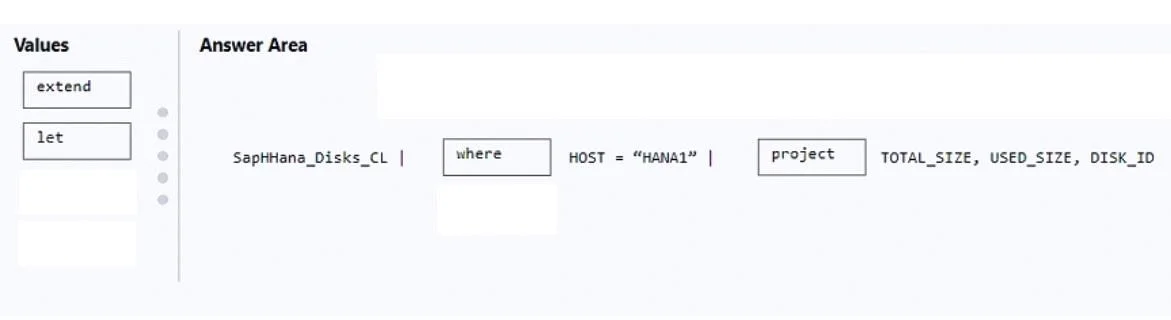
Answer Area
Drag items
Correct arrangement
- where
- project
Explanation
KQL Query Structure for Azure Monitor for SAP Solutions
This question tests your knowledge of Kusto Query Language (KQL) used in Azure Log Analytics / Azure Monitor.
The completed query looks like this:
SapHanaDisks
| where SystemId == "HANA1"
| project DiskName, FileSystem, SizeGB, UsedGB
Item-by-Item Explanation
Position 1: where
where is a row filter - it narrows the dataset to only the rows matching a condition. Here it filters records to only HANA1 (e.g., where SystemId == "HANA1").
Why it comes first: You must filter before shaping output. If you projected first, you might discard the column needed for filtering (like SystemId).
Position 2: project
project selects specific columns to include in the output. After filtering to HANA1, you use project to return only the disk-related fields you care about.
Why it comes second: It shapes the final output after the data has already been filtered - standard KQL pattern: filter → shape.
Why the Others Are Wrong Here
| Operator | Purpose | Why Not Used |
|---|---|---|
extend | Adds a new calculated column | Doesn't filter rows or select columns |
let | Declares a variable/subquery | Goes at the top of a query, not mid-pipe |
Common Mistakes
- Swapping where/project: Syntactically valid but inefficient, and risks projecting away the filter column before filtering
- Using
extendinstead ofproject:extendadds columns;projectselects columns - easy to confuse - Using
letinline:letbelongs at the beginning of a query as a variable declaration, not inside a pipe chain
Topics
Community Discussion
No community discussion yet for this question.