AZ-120 · Question #61
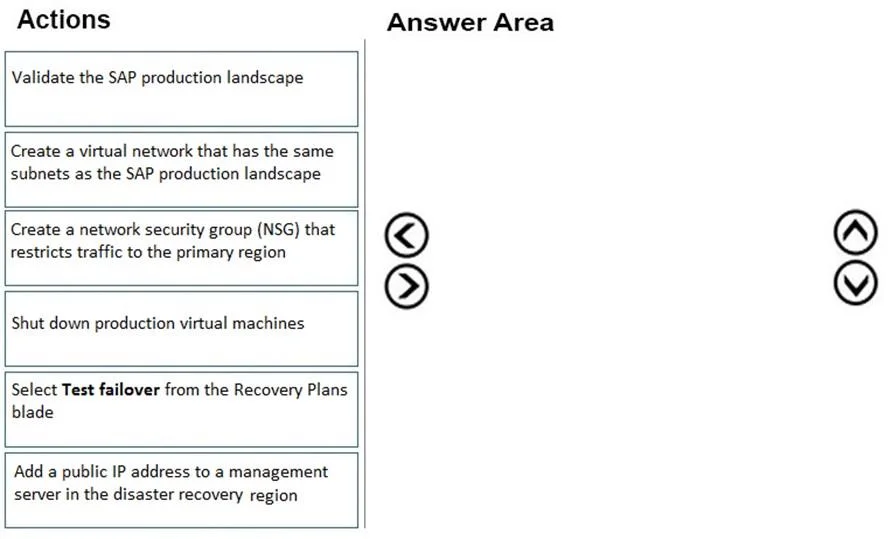
Drag and Drop Question You have an SAP environment on Azure. You use Azure Site Recovery to protect an SAP production landscape. You need to validate whether you can recover the landscape in the event
Azure Site Recovery: SAP DR Validation - Sequence Explained Core principle: Azure Site Recovery's Test Failover feature lets you validate recovery without disrupting production - it spins up VMs in an isolated network. Every step in this sequence sets up that isolation correctly
Question
Exhibit
Options
- Box1Create a virtual network that has the same subnets as the SAP production landscape
- Box2Add a public IP address to a management server in the disaster recovery region
- Box3Shut down production virtual machines
- Box4Select Test failover from the Recovery Plans blade
Explanation
Azure Site Recovery: SAP DR Validation - Sequence Explained
Core principle: Azure Site Recovery's Test Failover feature lets you validate recovery without disrupting production - it spins up VMs in an isolated network. Every step in this sequence sets up that isolation correctly before pulling the trigger.
Step-by-Step Reasoning
Box 1 - Create a virtual network with the same subnets as production
This is the prerequisite for everything else. Test Failover requires a dedicated, isolated network that mirrors production subnet layout so recovered VMs behave identically (same IPs, same routing logic). Without this first, the test failover either fails or the recovered VMs can't communicate properly. This network must not be the production VNet - isolation is what prevents the test from impacting live workloads.
Box 2 - Add a public IP to a management server in the DR region
Before triggering failover, you need a way into the DR environment to actually validate it. A management/jump server with a public IP (or Bastion) in the DR region gives you access to the isolated test VMs after they spin up. Setting this up beforehand avoids scrambling after the failover and ensures you can verify SAP application health (logins, DB connectivity, interfaces) during the test window.
Box 3 - Shut down production virtual machines
This is the most commonly misunderstood step. You shut down production VMs briefly so ASR can capture the latest app-consistent recovery point (not just crash-consistent). For SAP - especially SAP HANA - app consistency is critical: it ensures DB transaction logs are flushed and the recovered system is in a clean state. Without this, your test validates recovery to a potentially stale or inconsistent point, which defeats the purpose. After shutdown, production VMs are brought back up; the test runs in the isolated network.
Box 4 - Select Test Failover from the Recovery Plans blade
Only now do you execute. You trigger Test Failover from the Recovery Plans blade, selecting the isolated VNet created in Box 1. ASR spins up replicas in the DR region using the latest recovery point, without touching production. You validate the landscape, then clean up the test environment.
Common Mistakes
| Mistake | Why It's Wrong |
|---|---|
| Running Test Failover before creating the isolated VNet | VMs start with no network or land on the wrong VNet - test is invalid |
| Skipping the production VM shutdown | Recovery point may be crash-consistent only - dangerous for SAP HANA |
| Using a regular Failover instead of Test Failover | Regular failover actually cuts over production - massive unplanned impact |
| Adding the public IP after the test failover | You have no way to access the DR environment to validate it |
Key takeaway: The sequence is Prepare network → Prepare access → Capture latest state → Execute test. The phrase "minimize impact" is satisfied by using Test Failover (isolated VNet) rather than a real failover, and the brief production shutdown is the smallest possible disruption needed to get a valid, consistent recovery point.
Topics
Community Discussion
No community discussion yet for this question.