
AZ-120 · Question #370
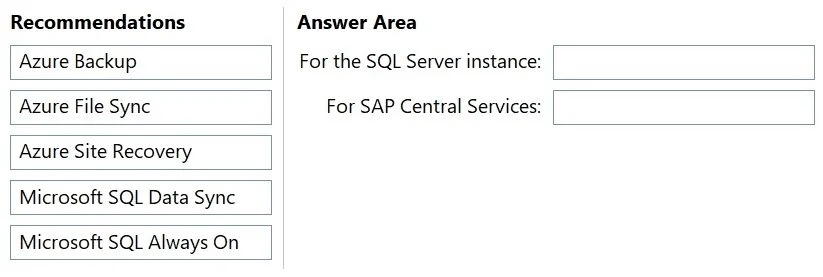
Drag and Drop Question You have an SAP production landscape in Azure. You need to recommend a disaster recovery solution that will enable failover between two Azure regions. The solution must…
The correct answer is Microsoft SQL Always On; Azure Site Recovery. SAP DR on Azure - Drag-and-Drop Explained The Correct Mapping | Workload | Recommendation | |---|---| | Microsoft SQL Server instance | Microsoft SQL Always On | | SAP Central Services (SCS) | Azure Site Recovery | --- Why Each Placement Is Correct 1. SQL Server → Microsoft SQL…
Question
Exhibit
Answer Area
Drag items
Correct arrangement
- Microsoft SQL Always On
- Azure Site Recovery
Explanation
SAP DR on Azure - Drag-and-Drop Explained
The Correct Mapping
| Workload | Recommendation |
|---|---|
| Microsoft SQL Server instance | Microsoft SQL Always On |
| SAP Central Services (SCS) | Azure Site Recovery |
Why Each Placement Is Correct
1. SQL Server → Microsoft SQL Always On
SQL Always On Availability Groups is the native, application-aware HA/DR mechanism for SQL Server. It replicates data at the database engine level, not the VM level.
Technical reasons it wins on RTO:
- Maintains a hot standby replica in the secondary region - the SQL instance is already running and synchronized
- Failover is near-instantaneous (seconds to low minutes) because no VM boot or database recovery is needed
- Supports both synchronous (zero data loss, slightly higher latency) and asynchronous (minimal latency impact, small data loss window) replication
- The secondary is always ready to serve reads or accept a failover promotion
No other option comes close for SQL RTO in a cross-region scenario.
2. SAP Central Services (SCS) → Azure Site Recovery
SCS (ABAP Central Services or Java Central Services) is not a database - it's a VM-based application workload that hosts the message server and enqueue server. It requires VM-level replication.
Technical reasons ASR is correct:
- ASR continuously replicates the entire VM disk state to the target region via block-level replication
- On failover, ASR spins up a pre-replicated VM image - much faster than restoring from backup
- ASR is Microsoft's officially recommended DR tool for SAP non-database workloads on Azure
- Recovery can be automated and tested without impacting production
Why the Other Options Are Wrong
| Option | Why It Fails |
|---|---|
| Azure Backup | Backup/restore model - RTO is high (hours) because you must restore data from a vault, not fail over a live replica |
| Azure File Sync | Syncs files to Azure Files shares - not a DR or failover mechanism for VMs or databases |
| Microsoft SQL Data Sync | Designed for multi-database synchronization (e.g., hybrid/edge scenarios), not for fast DR failover. No hot-standby capability; higher RTO than Always On |
Common Mistakes
- Using ASR for SQL Server: ASR can replicate a SQL Server VM, but you'd still need to boot the VM and run recovery - Always On has a pre-warmed instance ready, so it's faster. Always use the application-native tool when lowest RTO is required.
- Using Azure Backup for SCS: Tempting because it's familiar, but backup targets RTO in hours, not minutes. The question explicitly asks for lowest RTO.
- Swapping the two answers: Always On only applies to SQL Server. SCS has no Always On equivalent - ASR is the correct DR path for it.
Topics
Community Discussion
No community discussion yet for this question.