nerdexam
Microsoft

AZ-120 · Question #377

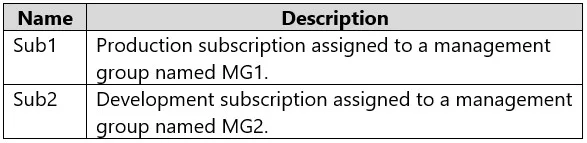
Drag and Drop Question You have two Azure subscriptions as shown in the following table. You plan to configure the following Azure policies: Policy1: Enforces resource tags to every resource in both…

The correct answer is Tenant Root management group; MG1. Azure Policy Scope Assignment - Explanation Understanding the Hierarchy Based on this question's context, the management structure is: `` Tenant Root Management Group ├── MG1 │ └── Sub1 (Production) └── Sub2 (Dev/Test) - or under MG2 `` The table (not shown) typically indicates…

Design and implement an infrastructure to support SAP workloads on Azure

Question

Drag and Drop Question You have two Azure subscriptions as shown in the following table. You plan to configure the following Azure policies: Policy1: Enforces resource tags to every resource in both subscriptions. Policy2: Enables Microsoft Defender for Servers for all existing and future production workloads. You need to identify the scope level to assign each policy. The solution must minimize administrative effort. At which scope level should you assign each policy? To answer, drag the appropriate scope levels to the correct policies. Each scope level may be used once, more than once, or not at all. You may need to drag the split bar between panes or scroll to view content. NOTE: Each correct selection is worth one point. Answer:

Exhibit
AZ-120 question #377 exhibit

Answer Area

Drag items

MG1MG2Sub1Sub1 and Sub2Tenant Root management group

Correct arrangement

  • Tenant Root management group
  • MG1

Explanation

Azure Policy Scope Assignment - Explanation

Understanding the Hierarchy

Based on this question's context, the management structure is:

Tenant Root Management Group
├── MG1
│   └── Sub1 (Production)
└── Sub2 (Dev/Test) - or under MG2

The table (not shown) typically indicates Sub1 is Production under MG1, and Sub2 is Dev/Test.


Policy1 → Tenant Root Management Group

Requirement: Enforce resource tags on every resource in both subscriptions.

Why Tenant Root:

  • The Tenant Root MG is the ancestor of every subscription and management group in the tenant.
  • Assigning here means the policy inherits automatically to all child scopes - both Sub1 and Sub2 - with a single assignment.
  • The alternative ("Sub1 and Sub2") requires two separate assignments and doubled administrative overhead whenever new subscriptions are added.
  • This directly satisfies the "minimize administrative effort" constraint.

Policy2 → MG1

Requirement: Enable Microsoft Defender for Servers for production workloads only.

Why MG1 (not Tenant Root):

  • MG1 contains only the production subscription(s).
  • Assigning at MG1 scope scopes Defender for Servers exclusively to production, avoiding unnecessary cost and coverage on dev/test workloads.
  • Assigning at Tenant Root would enable Defender on all subscriptions including non-production - that violates the intent and increases cost.
  • Assigning directly to Sub1 would work now, but if future production subscriptions are added under MG1, they'd be missed. MG1 covers existing and future production workloads automatically.

Common Mistakes

MistakeWhy It's Wrong
Assigning Policy1 to "Sub1 and Sub2"Two assignments instead of one; more admin effort; doesn't scale
Assigning Policy2 to Tenant RootEnables Defender on non-production workloads - violates the production-only requirement
Assigning Policy2 to Sub1 onlyMisses future production subscriptions added under MG1
Confusing MG1 with MG2The table establishes MG1 as the production management group - the label matters

Key Takeaway

The exam tests one principle: assign policies at the highest scope that satisfies the requirement without over-applying. For "all subscriptions" → go to the root. For "production only" → go to the production management group.

Topics

#Azure Policy#management groups#policy scope#resource tags

Community Discussion

No community discussion yet for this question.

Full AZ-120 Practice